Case study · Python · Qt · Browser extensions · Windows
I wouldn't pay for a download manager, and I wouldn't pirate one. So I built one.
The tool I wanted costs money every year, and the "free" copies floating around are cracked installers I'd never run on my own machine. This is how TurboGet went from a scope document to a signed browser add-on and a Windows installer, and the specific problems that nearly broke it along the way.
The problem
Browsers download a file over one connection. Servers often cap each connection. Those two facts waste most of your bandwidth.
Plenty of servers, mirrors and CDNs limit how fast any single connection can go. A browser opens exactly one connection per download, so on those servers it never gets near the speed your line can actually handle. Close the laptop lid, lose Wi-Fi for ten seconds, or let Windows restart for an update, and a 3 GB download often starts again from zero.
Download managers solve this by opening many connections to the same file, each asking for a different byte range. The well-known one is paid software with a yearly licence; the free versions people pass around are cracked builds. Neither was acceptable, so the requirement was simple to write down and hard to build: the same speed and reliability, a button on every video, free, and nothing I'd be uncomfortable running myself.
The approach
Scope first, then prove the speed before writing a single screen.
It started as a written scope document: three parts (a browser extension, a local download engine, a desktop app), explicit non-goals (no DRM, no cloud, no accounts), and five build phases, each ending in a gate that had to pass before the next phase began. Phase one's gate was blunt: a 1 GB file must download at least 2× faster than Chrome and survive the process being killed. No UI and no extension until that was true.
Reviewing that scope before building caught the first serious mistake. It planned to use httpx with HTTP/2. HTTP/2 multiplexes every request over a single TCP connection, which is exactly the thing a download manager exists to avoid: sixteen "parallel" range requests would all queue through one pipe. The engine uses aiohttp over HTTP/1.1 instead, where every worker really is its own connection.
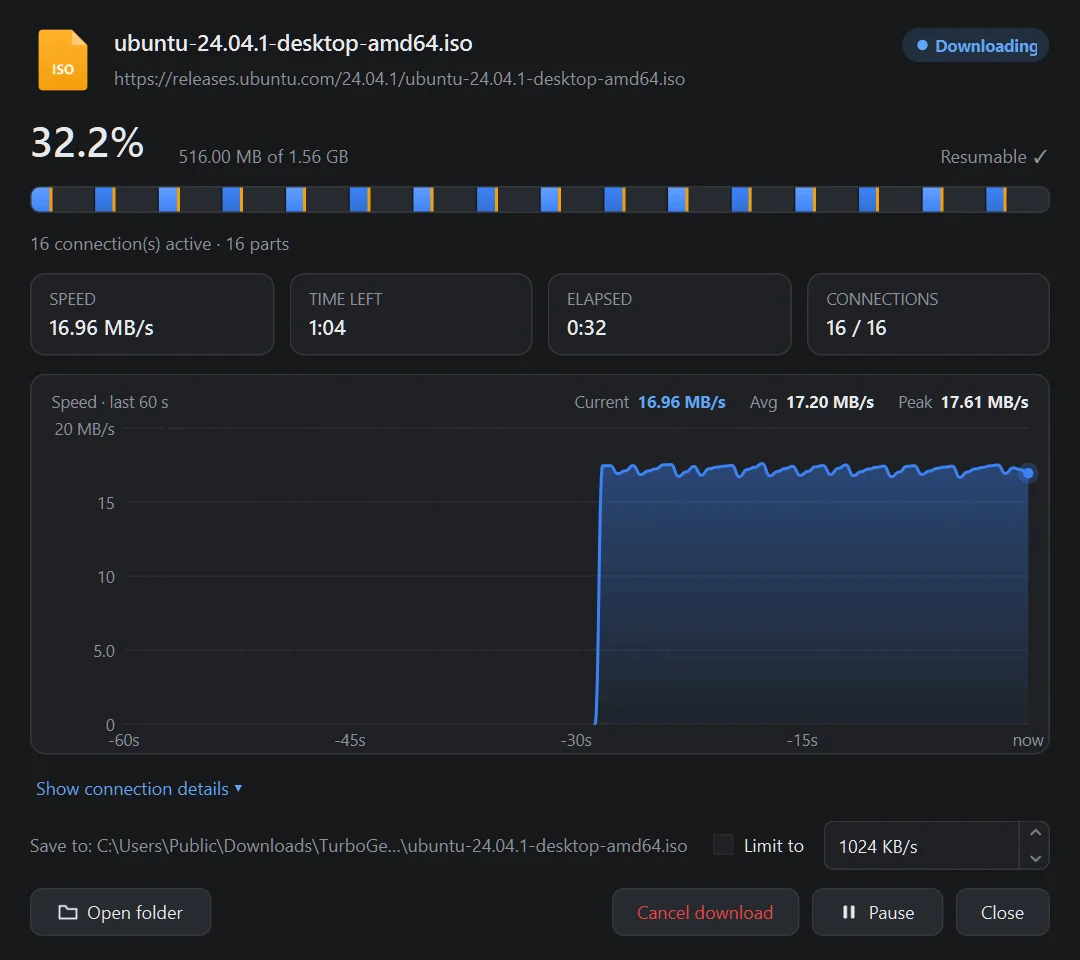
The gate result, against a local test server that limits each connection to 4 MB/s: a 100 MB file took 25.4 seconds on one connection and 2.0 seconds on sixteen, about 12.5×. Killing the process mid-download and starting it again resumed from the saved parts, and the SHA-256 of every finished file matched the source. Only then did the desktop app get built.
The engine
Sixteen connections, one file, and no merge step.
A download starts with a probe: a GET with Range: bytes=0-0, which is more reliable than HEAD and reveals the file size, whether ranges are allowed, the ETag and Last-Modified validators, and the real filename from Content-Disposition. The file is then split into parts, and each worker writes its bytes straight to its own offset in one pre-allocated .tgpart file. When the last byte lands, the file is renamed. There's no merging pass.
Dynamic segmentation is what keeps the end of a download fast. When a worker finishes its part, it doesn't go idle: it takes the second half of whichever part has the most bytes left, as long as both halves stay above 1 MB. Without that, the last few seconds of every download crawl along on one connection while fifteen sit unused.
Two details only show up on real Windows machines. First, pre-allocating a 2 GB file and then writing near its end makes NTFS zero-fill everything before that point, which stalls the download. The file is marked sparse before allocation (FSCTL_SET_SPARSE through DeviceIoControl), so writes land anywhere without the zero-fill. Second, every part's position is saved to SQLite every 1.5 seconds. Bytes still in a worker's 512 KB buffer are flushed even when the download is paused or cancelled, so "resume" never re-downloads data that was already received.
The browser bridge
A web page must never be able to start a download on your PC.
The extension never downloads anything itself. It spots media in network responses, takes over the browser's own downloads, and hands the request (URL, page, headers, the site's cookies) to the desktop app. The obvious way to do that is a WebSocket on localhost, and the scope even listed it as a fallback. It was removed: any website you visit can open a WebSocket to 127.0.0.1, and with no authentication, any page could have queued downloads on your machine.
The bridge uses the browser's native messaging instead. Chrome or Firefox starts a small helper program and talks to it over stdin/stdout, and only extensions whose ID is listed in the helper's manifest may connect. The helper then forwards messages to the running app over a local socket. That socket listens on a random port, and the port and a random token are written to a file only your Windows account can read. A connection that doesn't send the token first is dropped.
Some smaller problems came up on the way. An unpacked Chrome extension's ID is derived from its folder path, so moving the folder silently broke the bridge. A fixed public key in the manifest pins the ID. Edge reads native-messaging registrations from its own registry path, not Chrome's. And if the app wasn't running, the browser cancelled a download and handed it to nobody. Now the helper starts the app on demand, and the extension only takes a download over once the helper has answered.
Two browsers, two ways to catch a download
Chrome catches downloads after they start. Firefox catches them before.
In Chrome and Edge, the extension hooks downloads.onDeterminingFilename, checks the file type and size against your settings, cancels the browser's download, removes it from the download list and sends it to TurboGet. Firefox has no such event. There, the add-on uses a blocking webRequest.onHeadersReceived listener and cancels the response before Firefox turns it into a download, but only when the server says it's an attachment or sends a type Firefox wouldn't display anyway. PDFs and images that open in a tab are left alone. A downloads.onCreated fallback catches the rest.
The first real-world report was "takeover isn't working at all." The logs showed the browser had never started the helper even once: the extension simply hadn't been loaded. The same investigation found a real bug, though. If the desktop app had never been running, the extension had no list of file types to watch, so it caught nothing. The defaults now ship inside the extension itself.
The Firefox add-on passed Mozilla's automated review and is signed by Mozilla. It declares that it collects no data, and that's accurate: everything it sees goes only to the app on the same computer.
YouTube
Stuck at 0.0%, then 200 KB/s, then 4 MB/s.
Site downloads originally went through yt-dlp, run as a subprocess. On a long 1440p YouTube video, the first real-world report was a download frozen at 0.0%: the partial file was 0 bytes, and the app had no timeout, so it waited forever. Run without the browser's cookies, the same video downloaded, but at about 200 KB/s. YouTube throttles long single requests, and yt-dlp's concurrent-fragment option doesn't apply to plain HTTPS formats.
The fix splits the job. yt-dlp now only resolves which video and audio streams to fetch and returns their real URLs. TurboGet's own engine downloads both streams in parallel, over several connections, with every request capped at 10 MB, a size YouTube serves at full speed. ffmpeg then joins the two streams into one file without re-encoding. On the same video and the same line, speed went from about 200 KB/s to 3–4.4 MB/s, and pause and resume work exactly as they do for any other file.
Two more problems appeared during testing. Links obtained with logged-in browser cookies can be refused with a 403, so TurboGet now retries automatically with fresh, cookie-less links. Most public videos work that way. And asking for "best quality up to 1440p" quietly selected format 623, which turned out to be an HLS playlist (slow) rather than an HTTPS file. Format sorting now prefers HTTPS formats first, then H.264 up to 1080p, so the files play on any player. Downloads that make no progress for two minutes now stop with an explanation instead of sitting at 0% forever.
The architecture
What's running under it.
- Engine
- Python 3.14,
asyncioandaiohttpover HTTP/1.1, a token-bucket speed limiter shared by every worker, sparse pre-allocated files, and part positions saved to SQLite (WAL mode) every 1.5 s. - Streams
- Its own HLS parser (master and media playlists,
EXT-X-MAP, byte ranges, AES-128 keys), with parts fetched 16 at a time and joined byffmpegwith-c copy. DRM key formats are detected and refused. - Sites
yt-dlpfor extraction, with a bundled Node.js runtime for YouTube's JavaScript challenges andffmpegfor merging and MP3 conversion.- Desktop app
- PySide6 / Qt 6 on the main thread, with the engine on its own asyncio thread and Qt signals between them. The speed graph, chunk map and file icons are drawn in code, so the app ships no image assets. The taskbar progress uses raw COM calls, because Qt 6 removed its Windows taskbar API.
- Extensions
- Manifest V3 for the Chromium family and an MV3 Firefox build with blocking
webRequest. Both share one content script: an overlay button in a closed Shadow DOM, so a site's CSS can't break it, and DRM detection through the mediaencryptedevent. - Bridge
- Native messaging host, then an authenticated localhost socket (random port, random token, readable only by your user account), then the app. The host starts the app if it isn't running.
- Packaging
- PyInstaller builds two executables that share one runtime:
TurboGet.exe(the GUI) andturboget-helper.exe(a console program that serves as the native-messaging host, the bundled yt-dlp and the installer's register step). Inno Setup produces a per-user installer that needs no admin rights.
Bugs worth remembering
Small mistakes that would have shipped.
Quit didn't quit. In Qt 6, QApplication.quit() first asks every window to close, and the main window refuses, because closing it is supposed to minimise TurboGet to the tray. That silently cancelled the quit. The tray's Quit now calls exit() directly.
Quitting restarted the downloads it was stopping. On shutdown, running downloads are marked "queued" so they resume next launch. But each cancelled task's cleanup ran the queue scheduler, which saw queued downloads and started them again, so the app hung on exit. A closing flag now stops the scheduler during shutdown.
The installer ran out of memory. Inno Setup's compiler is a 32-bit program, and compressing about 500 MB at its highest LZMA2 setting failed with "Out of memory." Running the compressor as a separate 64-bit process fixed it, and the installer came out at 150 MB.
The rename. The project started as "SIDM." Renaming it to TurboGet meant moving the user's data folder, renaming the history database and the .sidmpart partial files, swapping the startup registry entry and re-registering the browser bridge under a new name, all without losing an unfinished download. Every one of those happens automatically on first launch.
The outcome
Honest about where it actually is.
TurboGet is a working, installable product. It reaches about 12× the speed of a single connection on servers that cap each connection, resumes after crashes and reboots, works in every major Chromium and Firefox browser, and downloads from YouTube faster than the tool it uses for extraction. The core of the scope's acceptance list was checked in real Chrome, Edge and Firefox, not only in unit tests: the overlay appearing on a playing MP4, takeover of a zip download, an encrypted HLS stream saved as one playable MP4, and resume after the process is hard-killed. Dropped connections were tested with a server that cuts connections at random. A real Windows reboot is the one item still waiting for a proper test run.
What it isn't yet: it's Windows only. The installer isn't code-signed, so SmartScreen asks for confirmation. The Chrome extension needs Developer mode until it's listed on the Chrome Web Store. And at 150 MB, the installer is large, because it bundles a full ffmpeg build and a JavaScript runtime instead of asking you to install them. Next on the list: a smaller ffmpeg build, a store listing, live-stream recording and in-app updates.
Try it yourself. It's free, needs no account and sends nothing to anyone.
Download TurboGet