Case study · Electron · Python · ffmpeg · Subtitles
The bug wasn't in the subtitle renderer. It was in how I was testing it.
Subtitle Studio captions the reels, Shorts and clips of Hamrah Podcast on my own PC. This is how it was built, the problems that only showed up on real videos and real Hindi, and what I found when I ran the finished app one more time to write this page.
The problem
Good captioning tools want your video first. That's the one thing I wasn't willing to hand over.
Hamrah Podcast is mostly spoken word, and its reels and Shorts live or die on captions: most viewers watch without sound, and default grey subtitles look like nobody tried. Captioning a clip well takes three things: accurate speech-to-text, a transcript you can fix before it's final, and captions that look designed. Every tool that does all three is a web upload or a paid API, so the video leaves your machine before a single word is transcribed. For footage you'd rather not hand to a stranger's server, that's disqualifying by itself, before any subscription price.
The free alternative is hand-timing subtitles in an editor like Aegisub, one line at a time. That's fine if you already know the ASS subtitle format, and it is not a workflow you can repeat for a clip a day.
The approach
Electron for the window, faster-whisper for the ears, ffmpeg for everything else.
An Electron app is the shell. When you press Generate, it asks ffmpeg to pull the audio out of the video as a 16 kHz mono file, then starts a Python subprocess running faster-whisper, which is Whisper on the CTranslate2 engine. The script reports progress as lines on its error stream and prints the finished transcript as one block of JSON, with a timestamp for every word, not just every sentence. Those word times are what make the fancy animations possible.
The window turns the edited transcript into an .ass file (Advanced SubStation Alpha) and ffmpeg burns it into the video through its bundled libass renderer. ASS is the one common subtitle format that supports custom fonts, pixel positions and per-word timing, and it's the same format hand-made subtitles use. Nothing is composited on a timeline afterwards: every animation is just a different recipe of ASS override tags.
Animations as code
Every animation is a few lines of subtitle syntax.
| Animation | How it's built |
|---|---|
| Fade | A 200 ms fade in and a 150 ms fade out. |
| Pop, zoom out, bounce | The text starts at a different scale (60%, 160%, 40%) and animates to full size over 120 to 220 ms. Bounce overshoots to 112% before settling. |
| Slide up, down, left, right | A move from an offset of 6% of the video height or 8% of its width into place, over 80 to 250 ms, with a short fade. |
| Shake | Four quick rotations of about 3 degrees, left and right, inside the first 320 ms. |
| Glow pulse | The blur swings between 1 and 6 on a 400 ms cycle for as long as the caption is on screen. |
| Rainbow cycle | The colour steps around the colour wheel every 250 ms. |
| Karaoke | One timing tag per word, taken from Whisper's word times, in hundredths of a second. |
| Word-by-word pop | A separate subtitle line per word, each one scaling from 55% to full size in 120 ms. |
| Typewriter | Every character starts invisible and fades in, spread across at most 70% of the caption's duration at 45 ms a character. |
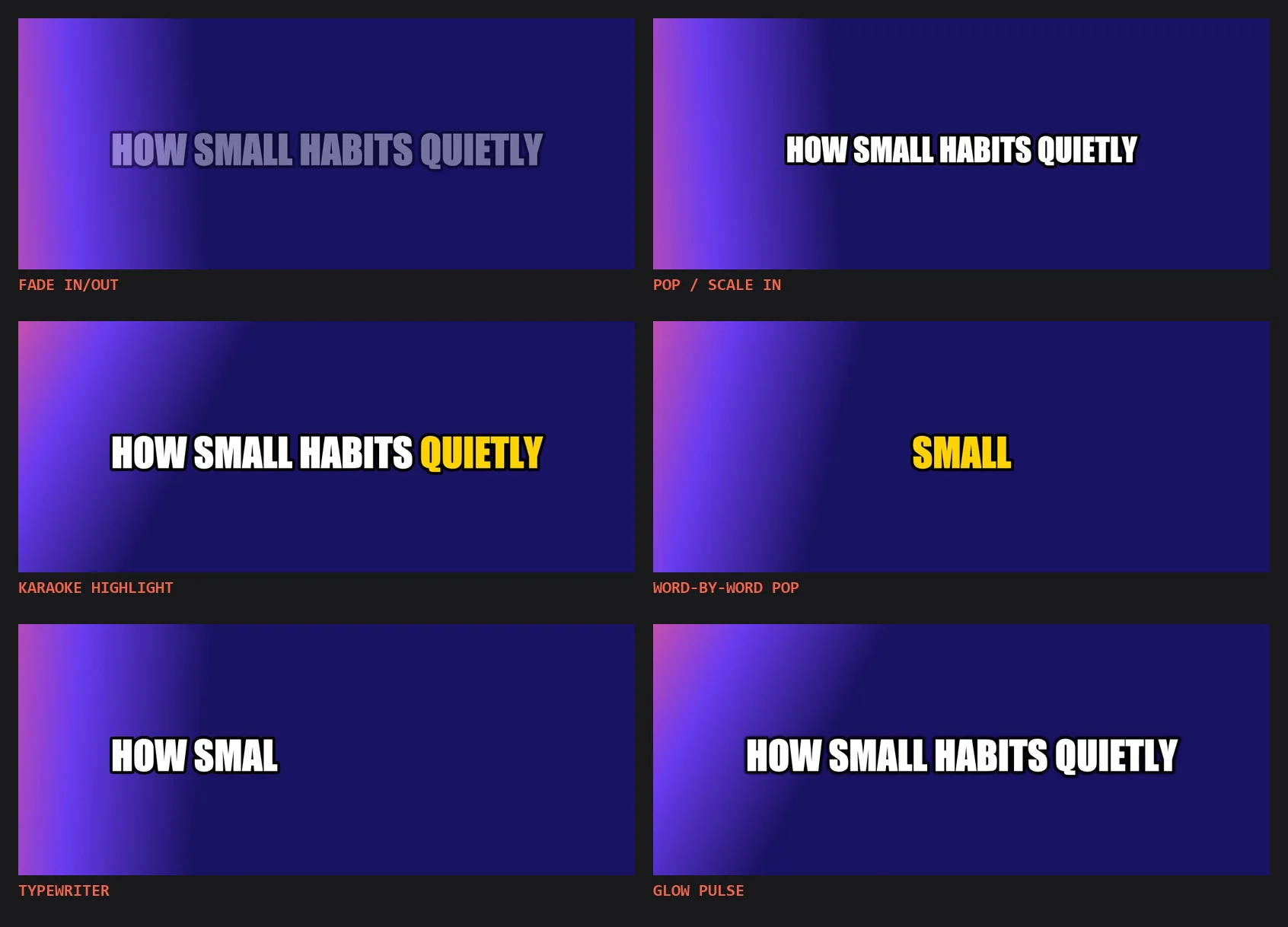
Six of those recipes, as frames cut from real exports of the same clip.
Preview versus export
A caption has to be the same size in the preview and in the file.
The preview caption is an ordinary web element measured in screen pixels. The export is rendered against the video's real resolution, often a lot larger. Left uncorrected, a caption that looks right in the preview comes out a completely different size in the exported video. The cause is simple: the video is shown at a fraction of its real size, and that fraction has to be applied to every size in the style.
Now the preview works out how much smaller than the real video it is showing (the displayed width divided by the true width) and scales the font size, outline, shadow and letter spacing by it. On the export side, the subtitle file declares the video's real width and height as its canvas, and positions are stored as percentages and turned into pixel coordinates at export time. So a caption set to size 84 on a 1080 by 1920 reel is the same proportion on screen as in the final file.
Hindi
Captions that showed up as empty boxes.
A podcast app has to caption Hindi, and after a report that Hindi captions in an exported video showed as empty boxes, I found two separate things that go wrong with non-Latin text on Windows, and the app now handles both. First, the subtitle renderer guesses a file's encoding from the system's code page, not UTF-8, which mangles any non-Latin script into garbage or missing letters. The fix is a byte-order mark at the start of the subtitle file, so the encoding is stated and not guessed. Second, the chosen caption font often has no Devanagari letters at all, and a given Windows PC might not have a font that does.
The fix for the second is to ship a font with the app: Noto Sans Devanagari, registered with the renderer through its fonts directory. When the chosen font lacks a letter, the renderer falls back to that bundled font whatever is installed on the PC. It's a failure I found by being told about it, not one I predicted, and the general lesson is not to rely on system state you don't control for something a viewer will actually see.
GPU, and what happens without one
A graphics card that works on paper isn't the same as one that works.
Transcription is much faster on an NVIDIA card, so the script asks for the GPU first. The first trap was that the CUDA libraries installed from pip are not on Windows' DLL search path. The model loads happily, so nothing looks wrong, and then the first real transcription fails silently because the GPU libraries can't be found. The engine searches the system path, not the mechanism Python offers for adding folders, so the library folders are put on the path itself before anything is loaded.
The rule everywhere is the same: try the fast way, and fall back without asking. If loading the model on the GPU fails, the script switches to the CPU with 8-bit weights and says so in the progress line. For export, it asks the card's hardware H.264 encoder first. If the encoder isn't there, the output is retried with the CPU encoder, so a machine without a GPU still gets the same captions on the same video, only slower.
The test that lied
I rebuilt a working animation system because my test said it was broken.
For a good while I was convinced most of the animations were broken: frozen, showing their starting frame however far into the clip I looked. I rewrote the whole animation system around that finding before checking the assumption underneath it. My test pulled a single frame out of the rendered video with ffmpeg's seek option placed before the input, and on the clip I was using, that kind of seek kept returning frame zero, whatever time I asked for.
The bug was in my test harness, not in the renderer's transform or move tags. Rebuilding the frame extraction around ffmpeg's select filter, which picks a frame by checking its actual decoded timestamp instead of seeking, proved every animation had been working the entire time. The rewrite got reverted. What stuck: verify the measurement before trusting what it measured.
One more run
Running the real app again, for this page, found three more things.
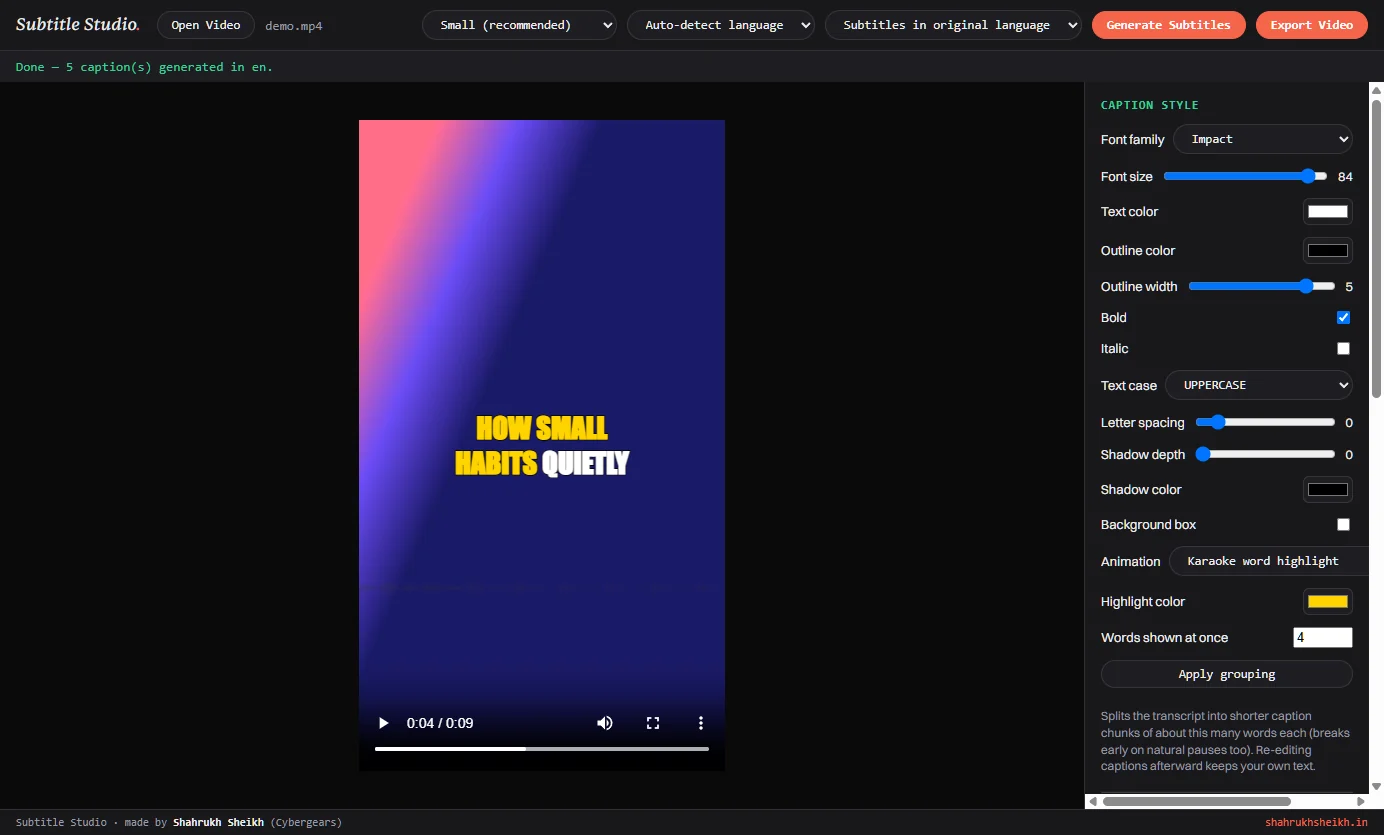
To make honest screenshots I drove the finished app end to end without changing it: a generated voice reading three sentences over a vertical 1080 by 1920 gradient, the real Generate button, then six real exports with a different animation each, and a frame cut from every result. It worked. The model loaded on the GPU in a few seconds, the 10-second clip came back as five captions with word timing in about four seconds, and each export took under a second. I also ran the transcription script with the Hugging Face hub switched to offline mode, and it loaded the cached model and finished normally, which confirms the model downloads once and then works without internet.
Looking at the results next to the preview turned up what no earlier test had. The karaoke colours are reversed in the export. In the preview, words light up as they're spoken. In the exported video the words still to come are the highlight colour. The cause is the way the subtitle format names its two colours: karaoke text starts in the secondary colour and changes to the primary as each word is sung, and the style puts the plain text colour in the primary slot. Swapping the two for the karaoke animation is the fix, and it's still on my list. Word-by-word animations ignore edits. Karaoke and word pop are built from Whisper's own words, so a correction typed into the transcript changes every other animation but not those two. And the preview wraps differently from the file: a long caption breaks onto two lines in the preview and sits on one line in the export, so the exported video is the thing to judge.
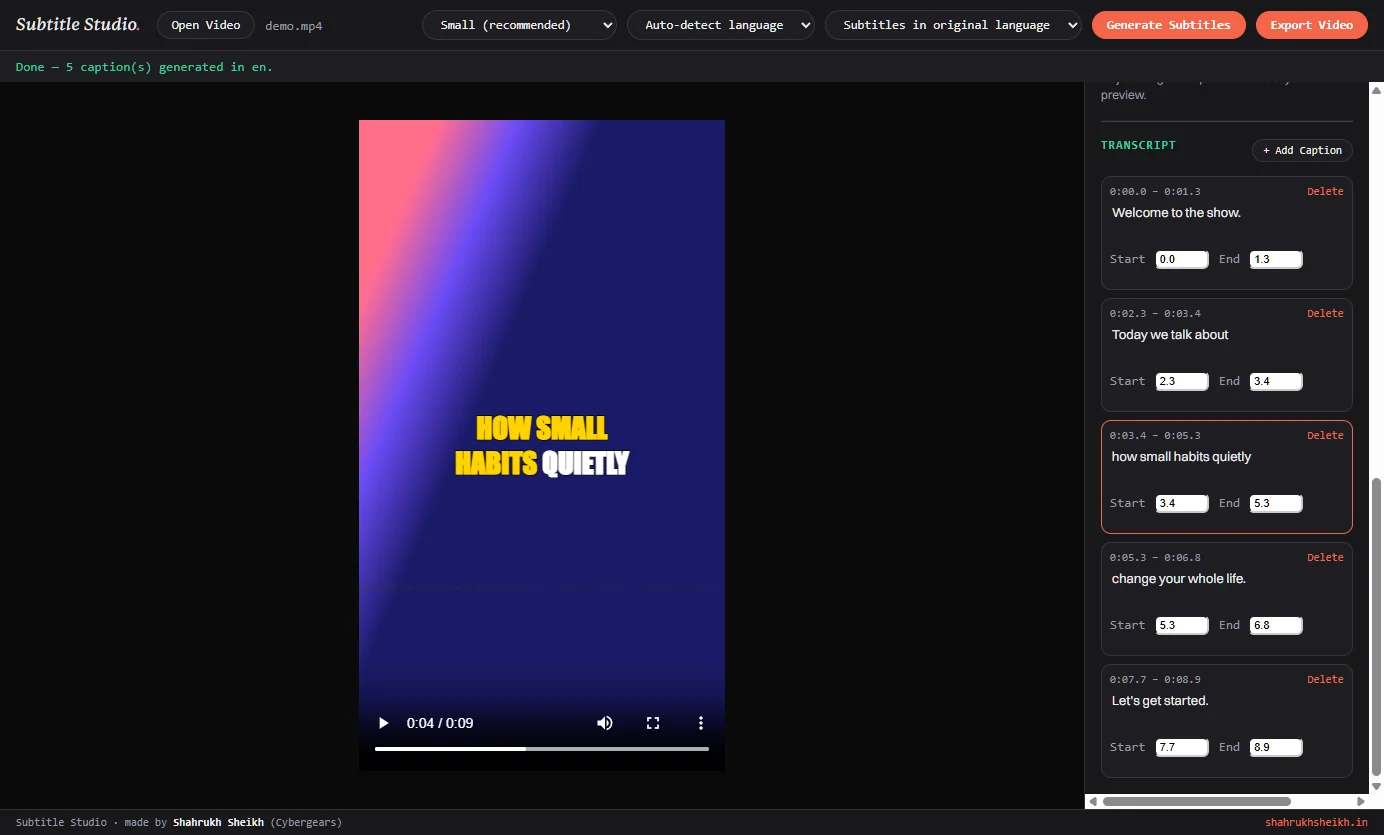
The five captions the real app generated from the test clip, ready to edit.
The architecture
What's actually running under it.
- Shell
Electron. The main process owns everyffmpegand Python subprocess and the file dialogs. The window handles the transcript, the style panel and the live preview, and talks to the main process only through a small, fixed set of calls.- Transcription
faster-whisperoverCTranslate2, with word timestamps and a voice-activity filter. CUDA in half precision when an NVIDIA card is available, otherwise the CPU with 8-bit weights. Five model sizes from Tiny to Large.- Captions
- Words are grouped into captions of about four by default, breaking early at pauses of more than 0.7 seconds. The result is turned into an
.assfile with one style and one recipe of override tags per animation. - Rendering
ffmpeg's subtitle filter with the bundledlibass, H.264 through the GPU encoder when it exists and the CPU encoder when it doesn't, with the audio copied as it is and progress read from ffmpeg's own output.- Fonts
- Eight common system fonts to choose from, plus a bundled Noto Sans Devanagari that the renderer falls back to for letters the chosen font doesn't have.
- Packaging
electron-builderproducing an NSIS installer that lets you choose the folder and adds a desktop shortcut. The Python environment, the engine, ffmpeg and the fonts ride along as extra resources, outside the app archive, because a program can't be launched from inside one.- Size
- The installer is about 1.3 GB and the installed app about 3.2 GB. Most of that is the Python environment, 2.3 GB of which the NVIDIA libraries take about 2.0 GB, plus a 424 MB ffmpeg build. The Whisper models are not inside it: each is downloaded the first time that size is used.
- Verification
- No automated test suite. The app was checked by hand on a test clip and, for this page, by driving the real app with a generated voice and cutting frames from the real exports.
The outcome
Honest about where it actually is.
It transcribes, edits, styles, animates and exports end to end on a machine with or without a graphics card, and nothing about your video leaves the computer. It's what captions the reels and clips of Hamrah Podcast. Because it already worked, it's free for anyone who needs it: email me and I'll send the installer.
What it isn't yet: it's Windows only, it handles one video at a time, and it exports a burned-in video but not a separate subtitle file. The installer is about 1.3 GB because it carries a whole local speech engine, which is the point, not a compromise, but it means this isn't a five-megabyte utility. The installer isn't code-signed. The karaoke colours are the first thing I'll fix, followed by making the word-by-word animations respect corrections.
Want a copy, or something like this built to run entirely on your own machine?
Get it free