
Subtitle Studio Free
Built for Hamrah Podcast · by Shahrukh Sheikh
Free · Windows 10 & 11 · Reels, Shorts and clips · Version 1.0.0
Captions that move, made on your own PC.
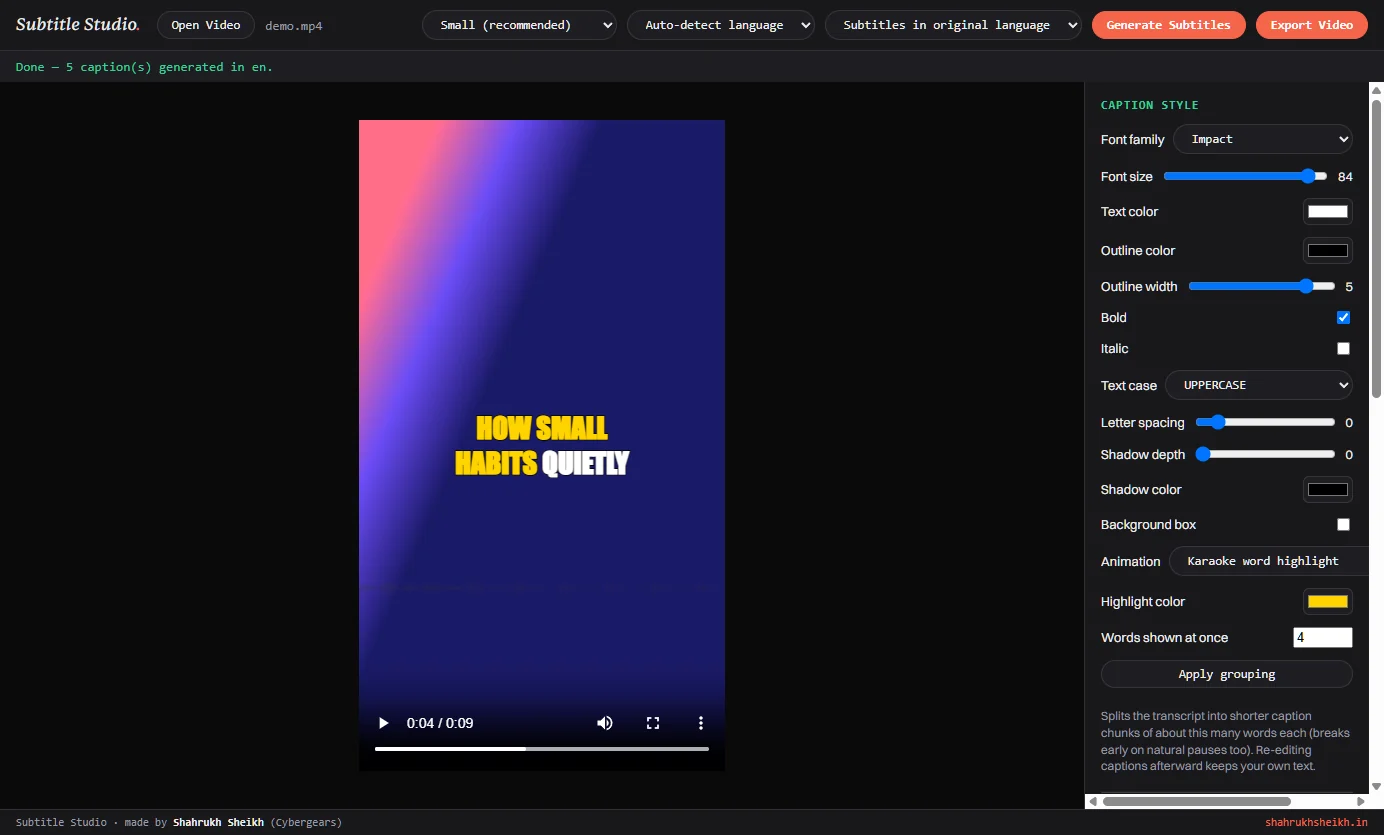
Subtitle Studio listens to the speech in your video, writes the captions with word-level timing, lets you fix and style them, and burns them into the video with 15 animation choices. It was built to caption the reels, Shorts and clips of Hamrah Podcast, and your video never leaves your computer.
Free · Email me and I'll send the installer · Nothing uploaded · Works with or without an NVIDIA GPU
At a glance
Subtitle Studio in numbers
15
Animation choices
14 effects, from a simple fade to word-by-word pops, karaoke and typewriter, plus a plain "none".
22
Spoken languages
Hindi, English, Urdu, Tamil and more, or auto-detect. It can also translate speech into English captions.
~4 s
To caption a 10-second clip
Measured on my PC (an RTX 4070, Small model), including loading the model. Every word came back with its own timing.
0
Videos uploaded
Transcription and rendering both happen on your own computer. There is no server behind this app.
Why it exists
A podcast is mostly talking, and most people scroll with the sound off.
Hamrah Podcast turns each conversation into reels, Shorts and clips. For those, captions aren't a nice extra: they are how a stranger understands the clip in the first second. They also need to look designed, with big bold words that appear as they're spoken, not default grey subtitles.
The tools that do this well are web services or paid subscriptions that want the whole video uploaded first, and the free alternative is hand-timing every line in a subtitle editor. I wanted something in between: accurate captions I can edit, animated the way short-form video expects, from a window on my own PC. Subtitle Studio is that, and since it already worked, it's free for anyone who needs it.
How it works
Six steps from a raw clip to a captioned video.
Open
Pick an MP4, MOV, MKV, AVI or WebM. It shows in the preview.
Transcribe
Whisper listens locally and returns every word with its timing.
Edit
Fix wrong words, adjust timing, add or delete captions, one box per caption.
Style
Pick a font, colours, outline, animation and where it sits.
Place
Drag the caption to exactly where you want it on the video.
Export
The captions are burned into a new MP4. Your original stays untouched.
Animations
Real frames from real exports.
Each picture below is a frame cut from a video that Subtitle Studio exported, using the same clip and the same style, with only the animation changed. The caption is bold Impact with a thick outline, placed in the middle of a vertical 1080 by 1920 video.
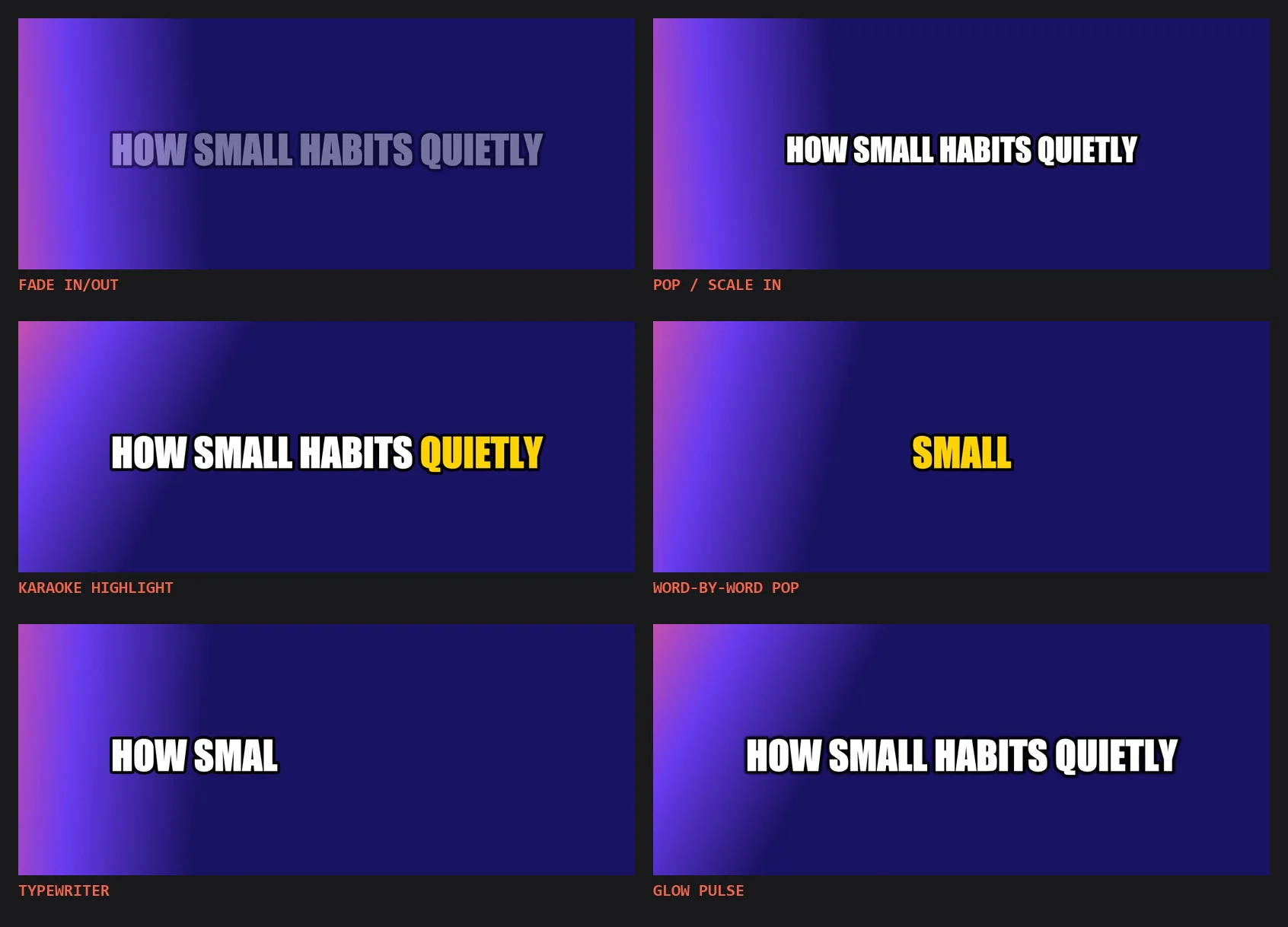
Fade, pop, karaoke, word-by-word pop, typewriter and glow, each exported from the same clip.
Basic
- None
- Fade in and out
- Pop (scale in)
- Zoom out
- Bounce
Motion
- Slide up
- Slide down
- Slide from right
- Slide from left
- Shake
Colour and glow
- Glow pulse
- Rainbow cycle
Word by word
- Karaoke word highlight
- Word-by-word pop (Shorts style)
- Typewriter
The live preview in the app is a close approximation, not a copy: some effects, like the typewriter, are shown more simply there. The exported video is what you get, so export a short stretch first when you're trying a new animation.
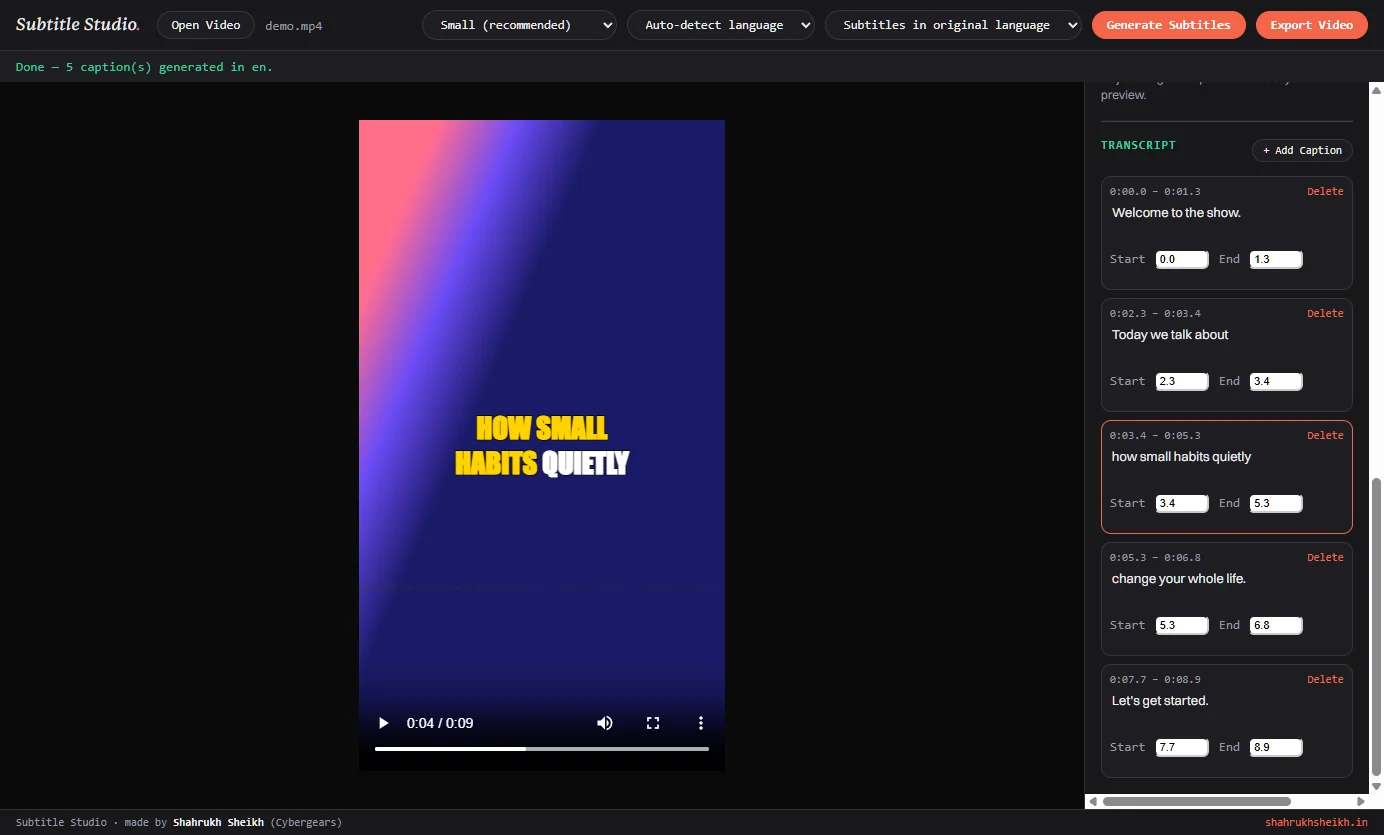
Edit before you export
The transcript is yours to fix.
Speech-to-text is good, not perfect, and names and Hindi words are where it slips. Every caption is a box you can change before anything is rendered.
- Edit the words in any caption, and its start and end times to a tenth of a second.
- Click a caption to jump the video to that moment.
- Add a caption at the current playhead, or delete one you don't want.
- Words shown at once: captions are cut into chunks of about 4 words by default, and also break at natural pauses of more than 0.7 seconds. Change the number and press Apply.
- Whisper's word-by-word timing is kept behind every caption. Karaoke and word-by-word pop follow those words, so a correction you type is used by every other animation, but those two keep showing the original word.
The result
Same frame, before and after.
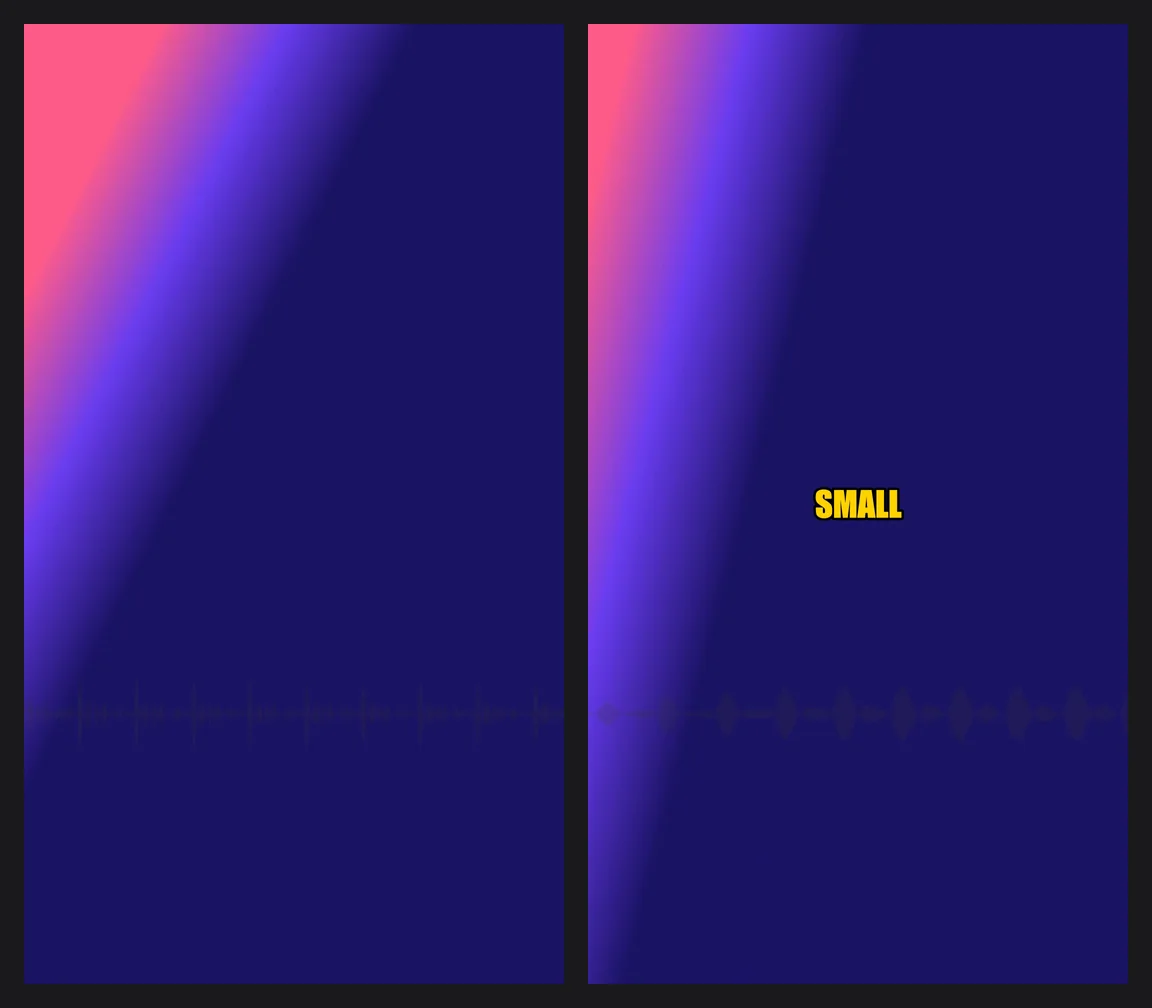
Left: the original clip. Right: the exported video with Word-by-word pop. The demo clip is a generated test voice over a gradient.
The clip used for these pictures is a short generated voice, so the same test can be repeated exactly. The app took it from video to captions in about four seconds, and each export of the ten-second clip took under a second on a graphics card that supports hardware video encoding.
Every feature
Everything Subtitle Studio does.
Transcription
- faster-whisper, the Whisper speech model, runs on your computer.
- Five model sizes: Tiny (fastest), Base, Small (recommended), Medium and Large (most accurate).
- Word-level timing for every word, which powers the karaoke and word-pop animations.
- Silence is skipped by a voice-activity filter, so captions don't appear over quiet gaps.
- Uses your NVIDIA GPU if you have one, and falls back to the CPU by itself if you don't.
Languages
- Auto-detect the spoken language, or pick it yourself when auto-detect guesses wrong.
- 22 languages: English, Hindi, Urdu, Bengali, Tamil, Telugu, Marathi, Gujarati, Punjabi, Arabic, Spanish, French, German, Italian, Portuguese, Russian, Japanese, Korean, Chinese, Turkish, Vietnamese and Indonesian.
- Translate to English: turn speech in any of them into English captions.
- Hindi renders correctly on any PC: a Devanagari font is bundled with the app.
Caption style
- Font: Arial, Verdana, Georgia, Impact, Comic Sans MS, Segoe UI, Tahoma or Trebuchet MS.
- Size from 18 to 90, bold, italic, and text case: normal, UPPERCASE, lowercase or Capitalize.
- Text colour, outline colour and width (0 to 6), letter spacing and shadow with its own colour and depth.
- Background box behind the text, with its own colour and opacity.
- Highlight colour for the karaoke and word-pop animations.
- Sizes are matched to the real video resolution, so what you set is the size you get on a 1080 by 1920 reel.
Placement
- Drag the caption straight on the preview to put it anywhere.
- Quick positions: left, centre or right, and top, middle or bottom.
- Fine X and Y sliders for exact placement.
Transcript editing
- Edit every caption's text and its start and end times.
- Add a caption at the playhead and delete any caption.
- Regroup the whole transcript into shorter or longer chunks in one click.
- The current caption is highlighted in the list as the video plays.
Export
- MP4 output with your captions burned in. The original file is never changed.
- Hardware encoding: H.264 on an NVIDIA GPU (NVENC) for speed, with an automatic retry on the CPU encoder (libx264) if the GPU can't do it.
- Audio is copied without re-encoding, so sound quality is untouched.
- A progress readout while it renders, and a clear message if something goes wrong.
- Opens MP4, MOV, MKV, AVI and WebM videos.
Get it free
It's free. Email me and I'll send it to you.
Subtitle Studio 1.0.0
There's no public download link. Write to me with the details below and I'll send you the installer. It includes everything it needs.
Email: ssheikh111@gmail.com
SHA-256 (Subtitle Studio Setup 1.0.0.exe): eb919525e0b6b2684c0be2ccfe8cce298a750f7a6c7012faa50b2c0b49f7a776
Check the file I send you against this checksum. In PowerShell: Get-FileHash ".\Subtitle Studio Setup 1.0.0.exe". The installer isn't code-signed yet, so Windows SmartScreen may say "Windows protected your PC": choose More info, then Run anyway.
How to get it
- Press the button above, or write to ssheikh111@gmail.com.
- Tell me your name, what you'll caption, and your Windows version. It helps to say whether you have an NVIDIA graphics card.
- I'll send you the installer.
- Run it, choose a folder and start captioning.
The first time you use it
- The installer is large because it carries its own speech engine, GPU libraries and ffmpeg.
- The Whisper model is not inside the installer. The first time you use each model size, the app downloads it, so you need internet that once. Tiny is about 75 MB and Large about 3 GB.
- After that, the model is on your PC and it works without internet.
System requirements
What you need.
| Windows | Windows 10 or 11, 64-bit |
| Disk space | About 3.2 GB once installed, plus the Whisper model you choose |
| Graphics card | Optional. An NVIDIA card makes transcription and export much faster. Without one it uses the CPU. |
| Internet | Only to download a Whisper model the first time you use each size |
| Videos | MP4, MOV, MKV, AVI or WebM in. MP4 out. |
| Included | Python, faster-whisper, ffmpeg and the CUDA libraries. Nothing else to install. |
Being honest
What it doesn't do.
- Windows only. There's no Mac, Linux or phone version.
- One video at a time. There is no batch queue.
- The installer is big, about 1.3 GB, and the model downloads on top of it the first time.
- No subtitle file export. The output is a video with captions burned in. You can't save an .srt or .ass file.
- Eight fonts. The list is fixed to the fonts above. You can't pick another font file.
- Known issue: in an exported video the Karaoke highlight colours are the wrong way round compared with the preview. The preview lights words as they are spoken; the export colours the words still to come.
- Word-by-word animations ignore your corrections. Karaoke and word-by-word pop show the words Whisper heard. If you fix a word, use another animation for that caption style.
- The transcript needs a read-through. Accuracy depends on the audio and the model, and names are where it slips.
- Not code-signed, so Windows SmartScreen asks you to confirm.
FAQ
Questions people ask first.
Is it really free? How do I get it?
Yes, it's free to use. There's no public download link: email me at ssheikh111@gmail.com and I'll send you the installer.
Is my video uploaded anywhere?
No. The audio is pulled out of the video on your PC, transcribed on your PC, and the captions are rendered into the video on your PC. The only thing the app downloads is a Whisper model, the first time you use each size. It sends nothing of yours anywhere.
Do I need an NVIDIA graphics card?
No. With one, Whisper and the video encoder use the GPU and everything is much faster. Without one the app falls back to the CPU on its own: it still works, it's just slower, so use a smaller model such as Small or Base.
Does it work for Hindi?
Yes. Choose Hindi as the spoken language, or leave it on auto-detect. A Devanagari font is bundled with the app, so Hindi captions show properly even on a Windows PC that has no suitable font. As with every language, read through the transcript before exporting.
Can it translate my captions?
Into English only. Choose "Translate to English" and Whisper writes English captions from speech in any of the supported languages. For captions in the original language, leave it on "Subtitles in original language".
Which model size should I use?
Small is the default and a good balance. Use Tiny or Base for a quick draft or on a computer without a graphics card. Use Medium or Large when accuracy matters most and you have an NVIDIA card.
Why is the installer so large?
It carries everything: its own Python, the Whisper engine, the NVIDIA libraries for GPU use (about 2 GB on their own once unpacked) and ffmpeg. That's what lets it run with nothing else installed, and it's why the installer is about 1.3 GB and the installed app about 3.2 GB.
Can I get an .srt file?
No. Subtitle Studio makes a video with the captions burned in, which is what reels and Shorts need. It doesn't export a separate subtitle file.
Does it change my original video?
No. Export always creates a new MP4 where you choose to save it, named after your video with "-captioned" added by default.
How it got here
Built for one podcast, shared because it works.
1.0.0 September 2026 · current
- Whisper transcription with word timing, an editable transcript, 15 animation choices, full caption styling and placement, and burned-in MP4 export.
- Hindi captions fixed after a report of empty boxes in an exported video: a Devanagari font is now bundled and the subtitle file is written as proper UTF-8.
- GPU use for transcription and export, with automatic fallback to the CPU for both.
- A Windows installer that carries Python, the Whisper engine and ffmpeg.
Want the build story: how every animation became subtitle code, why the captions came out the wrong size at first, and the test that nearly sent me down the wrong road?
Read the case study