Case study · C++ · JUCE · Signal processing · FL Studio
I wanted to hum a melody into FL Studio. Hearing the pitch was the easy part.
A voice-to-MIDI tool is really three problems: deciding what counts as a note, telling a singer's mistakes from their intentions, and getting the result into a DAW that doesn't want to be written to. This is how PitchPen went from a scope document to an installer, and the places it nearly went wrong.
The problem
A human voice is the worst possible input for a machine that wants exact notes.
A MIDI note is simple: a number from 0 to 127, a start and an end. A voice is not. It slides into notes, wobbles with vibrato, drifts flat over a long vowel, breathes in the middle of a phrase, and is rarely in tune unless you have trained for years. Turn that stream straight into note names and one held note becomes six: C4, C4 a little sharp, C4 a little flat, B3 for a single frame, C4 again.
The brief I wrote for myself was short: a producer should be able to hum an idea and get usable MIDI, without knowing which notes they are singing. Behind it sat firm constraints. Everything runs locally, with no cloud service. One voice at a time. Windows and FL Studio first, but with the music logic kept apart from FL Studio, so other DAWs stay possible. And a rule that shaped the whole project: do not fake support where the host doesn't provide it.
The approach
Find out what FL Studio allows before writing a line of code.
The most attractive design is also the most likely to be impossible: a plugin that writes notes into the Piano Roll of whichever instrument you've selected. So the first deliverable was a scope document that compared six ways of reaching FL Studio. The research settled it quickly. FL Studio has no public way for a plugin to write notes into another channel's Piano Roll. Its MIDI Out plugin sends notes only outward, from a Piano Roll to a device. What it does officially offer is Piano Roll scripting: a Python script, run from the Piano Roll, that can add and edit notes.
| Option | The idea | Verdict |
|---|---|---|
| A | A VST3 plugin that outputs MIDI to the host | Rejected: it only reaches the host's generic routing, not one instrument's Piano Roll. |
| B | Make a MIDI clip the user drags in | Kept as the universal fallback. Always works, but is manual. |
| C | Plugin or app, plus a Piano Roll script | Chosen as the main route into FL Studio. |
| D | Stand-alone app plus a script | Viable. Became the stand-alone build. |
| E | Everything inside FL Studio's scripting | Rejected: scripts cannot reach the microphone or run audio processing. |
| F | A hybrid of the above | What was built. |
The result was a layered design. Core is a C++ library with no plugin or UI code: pitch tracking, note cleanup, key detection, quantizing and MIDI writing. On top of it sit a JUCE plugin shell that builds both a VST3 and a stand-alone app, and a thin FL Studio bridge. Anything that touches FL Studio lives in that one place. Mouse automation, fake clicks and screen reading were ruled out in the brief, because they break the first time the interface changes.
Hearing a voice
Why a 1990s pitch algorithm beat a neural network here.
The brief asked for a real comparison of pitch methods, weighing accuracy, CPU, latency and complexity, with no cloud dependency allowed in version 1.
| Method | For a single voice | Decision |
|---|---|---|
| Plain autocorrelation | Cheap, but makes octave mistakes on breathy voices | Not alone |
| FFT / cepstrum | Good on steady tones, weak on a moving pitch | Cross-check only |
| YIN | Very good on voice, small, with a built-in measure of how periodic the sound is | Chosen |
| pYIN | YIN plus smoothing across frames, fewer octave errors | Planned for an offline pass, not in 1.0 |
| McLeod (MPM) | Comparable to YIN, with different failure modes | Alternative |
| CREPE and other neural models | Most accurate, but needs a neural runtime and model file | Left out of version 1 |
YIN works by asking how well a sound matches a delayed copy of itself. It computes that difference for every possible delay, normalises it so quiet and loud notes compare fairly, then takes the first delay that dips under a threshold. The best delay, refined with a parabola through its neighbours, is one period of the note, so frequency is the sample rate divided by it. The depth of the dip also says how periodic the sound is, and PitchPen turns that into a confidence for every moment.
The numbers are chosen for voices. The window is about 32 ms: 1,536 samples at 48 kHz, scaled for 44.1, 88.2 and 96 kHz so it always covers the same time. It moves forward a quarter of a window at a time, which gives roughly 125 measurements a second. A longer window sees more of a low note and is steadier, but adds delay. The result is a total of about 24 ms (half a window plus one step), which is short enough that the pitch curve feels attached to your voice. Searching only between 60 Hz and 2 kHz keeps the sub-period false dips and rumble out, while still covering deep voices and whistling.
Two small decisions matter more than they look. First, when no delay dips under the threshold, the deepest local minimum is still accepted if the sound is periodic enough, so unsteady singing yields a lower confidence instead of a gap. Second, each measurement is stamped at the centre of its window, not the start. Without that, every note would land 16 ms before it was sung.
I was honest with myself about one deviation. The scope planned a more careful offline pYIN pass after capture. What shipped is YIN plus a pitch-hold step, because the live analysis thread already produces the frames, and reusing them means any setting change can rebuild the melody instantly. The cost is that the tracker itself can't be re-run with different parameters after capture. A proper pYIN pass remains on the list.
From wobble to notes
Deciding when a note is really a new note.
Rounding each measurement to the nearest note flips the instant a pitch crosses the halfway line. A singer who holds a note 40 cents sharp, with vibrato of plus or minus 25 cents, crosses that line again and again. PitchPen puts three things between the raw pitch and the note list.
A tolerance. A note is held until the pitch is clearly somewhere else: 50 cents away on Tight, 65 on Normal, 85 on Loose. The hold resets after about 25 ms of silence, so a new phrase starts fresh. Segmentation then groups the stream into runs. A run too short to be a real note is folded back into the equal-pitch notes on either side of it, and a short gap between two equal notes is bridged, because it was a breath and not a rest. Finally, smoothing at three strengths merges remaining short notes into a longer neighbour: only equal pitches at Low, anything within two semitones at Medium, any pitch at High.
Tests found a real bug in that last step. A short blip between two equal notes was being merged into one of them, leaving two adjacent notes of the same pitch instead of one. The smoother now merges both sides together when the neighbours match. The test that caught it uses the scope's own example: a held C4 with a one-frame B3 glitch in the middle must come out as a single note.
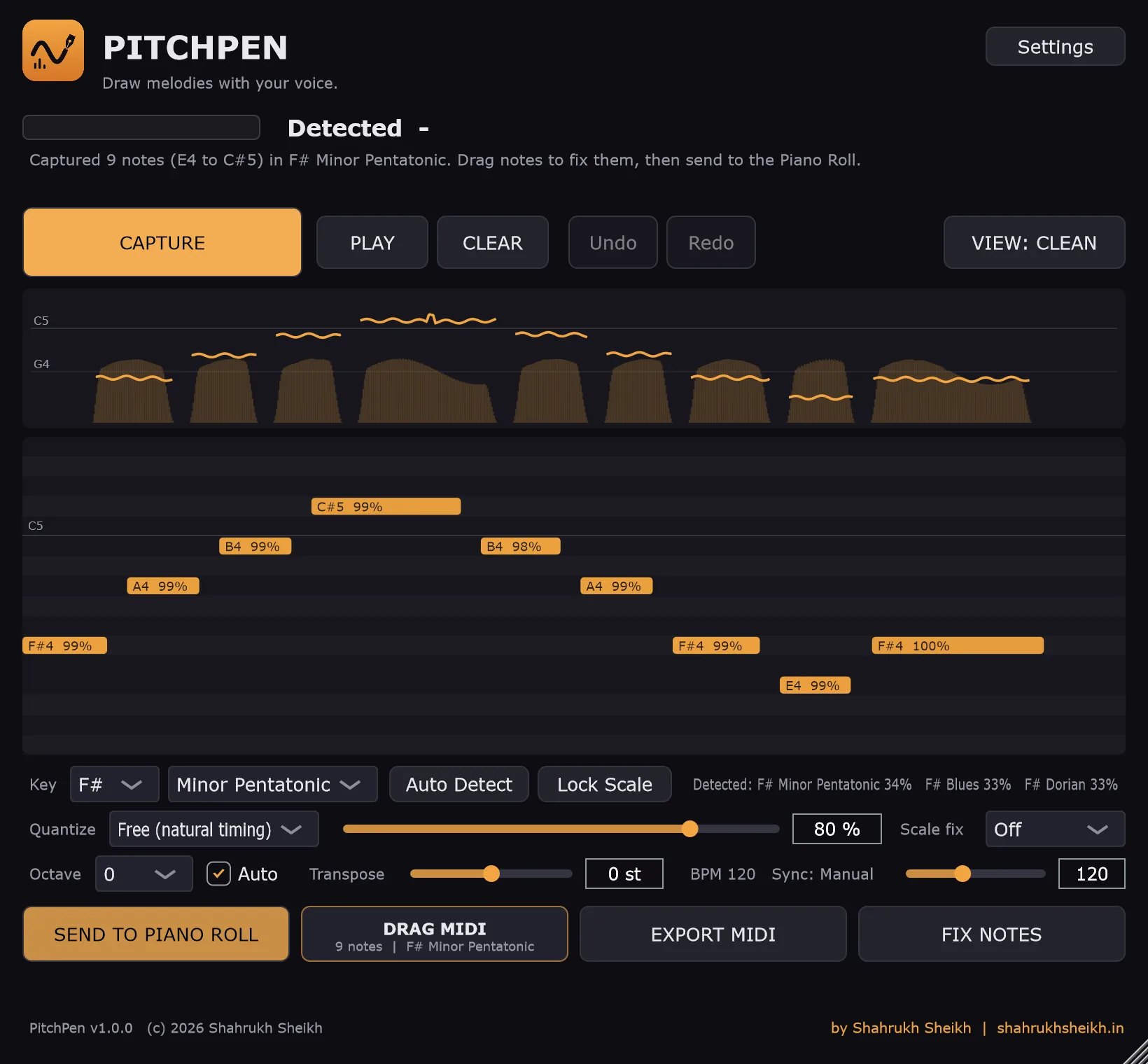
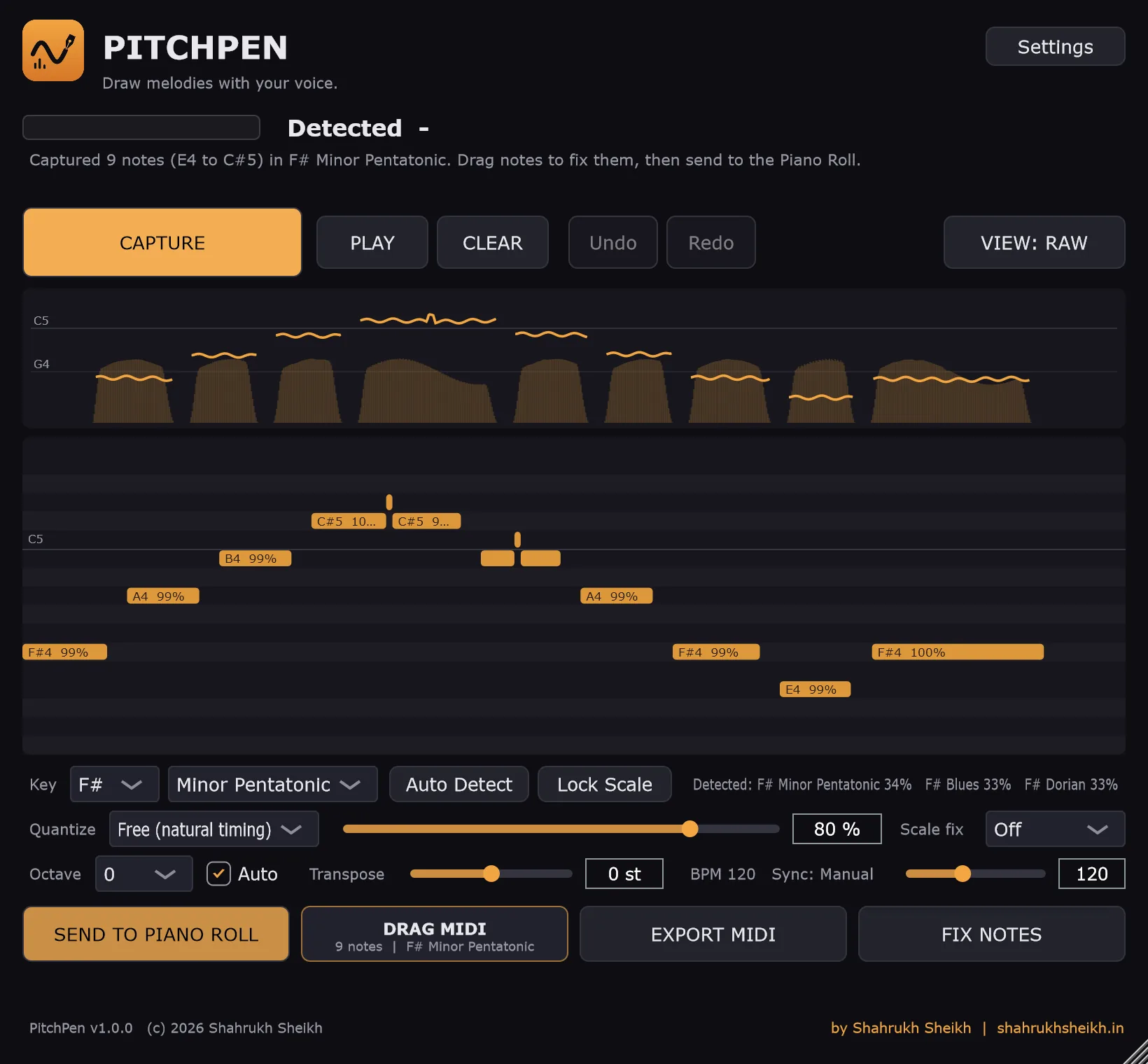
A wavering hum, the six notes PitchPen keeps, and the extra notes it avoids.
When it met a real voice
The detector was right. The defaults were wrong.
On generated voices, with harmonics and vibrato and a weak fundamental, the pitch tracker returned the right note every time. My own first real take was different: the notes landed high, around C6, and flipped between neighbouring semitones, so what came out of the Piano Roll didn't sound like what I had hummed. I'm not a trained singer, which made it the right test.
That one take changed the defaults. Loose tolerance and Auto Octave are now on from the start. Auto Octave lifts the whole melody by whole octaves so its middle sits around F#4, which is where instruments are comfortable. The capture summary also reports the range it found ("Captured 9 notes, E4 to C#5"), so a melody in the wrong register is obvious at a glance. The point of a tool for non-singers is that the forgiving settings are the ones you get without asking.
Finding the key
C major and A minor are the same notes. Telling them apart took three attempts.
The first version scored each of the 144 candidate scales (12 roots by 12 types) by the share of the melody's time spent on notes inside that scale. It looked sensible and could not work. C major and A natural minor contain exactly the same seven pitch classes, so any "how many of the notes fit" measure scores them identically. My own two tests made this obvious: a C major scale and an A minor scale have the same pitch classes, yet the tests expected opposite answers.
Attempt one: perceptual profiles. The Krumhansl-Kessler key profiles describe how important each scale degree usually is in a major or minor key, and are far better than in-or-out. For the other ten scales PitchPen uses approximate profiles built from the interval pattern, calibrated to the same size so no scale wins just by being more concentrated. But the two tests still couldn't both pass, because the two melodies fed in the same histogram. Content alone cannot separate them.
Attempt two: where the melody starts and ends. Melodies overwhelmingly begin and end on their tonic, so the first and last notes get extra weight. That flipped the relative-key cases. It also produced a new bug: a pentatonic scale, which leaves out two notes the melody used, scored higher than the full scale, because cosine similarity rewards a sparse profile that lines up well on a few strong notes.
Attempt three: coverage. Every score is now multiplied by how much of the melody the scale actually contains. Even then, the right answer lost by a hair. In the A minor test, three other modes tied each other at 0.63399 while the correct natural minor scored 0.63369, behind by 0.0003. Cubing the coverage term fixed it decisively: those three modes, each missing one note the singer used, fell to 0.5572, and natural minor's closest remaining rival was D Dorian at 0.5870, which uses the same seven notes but fits the tonic worse. A scale that misses even one note the singer used should lose clearly, not slightly.
It's still a heuristic, and PitchPen says so in the interface: it shows the top three guesses with percentages, and lets you lock the key yourself. A melody that neither starts nor ends on its tonic can fool it.
Real time
The audio thread does almost nothing, on purpose.
Audio code has one hard rule: the thread that fills the sound card's buffer must never wait. PitchPen's audio thread only filters (DC removal, a 70 Hz high-pass, a noise gate), measures level, mixes everything down to mono, and pushes samples into a fixed-size lock-free queue. It allocates nothing, locks nothing and touches no files. A separate high-priority analysis thread reads the queue, runs the pitch tracker and keeps a short history for the live curve. The interface thread only reads results.
While you capture, the analysis thread also keeps every pitch frame. When you press Stop, everything after pitch tracking, which is segmentation, key detection, quantizing and velocities, runs on those frames and is quick enough to feel instant. That's why changing a preset, the tolerance or the grid after capture feels instant, and why the raw audio never needs to be stored.
One trap came from the framework. JUCE's stand-alone wrapper starts with the microphone input muted to prevent feedback, a default I found in its source. Left alone, PitchPen would have shown a dead meter on first launch. PitchPen unmutes it, and stays safe by outputting silence unless monitoring is switched on.
Into FL Studio
Four ways FL Studio's script sandbox said no.
The plan was clean. PitchPen writes the melody to a small file. A Piano Roll script reads it and calls score.addNote(). I had seen community scripts that read and write files with ordinary Python, so I assumed it would work. FL Studio 2026 runs Piano Roll scripts in an embedded Python 3.12 sub-interpreter, and the first run produced an error box instead of notes. Each fix I tried failed with a different message:
| What the script tried | What FL Studio answered |
|---|---|
Read the file with open() | A SystemError: the file object "returned NULL without setting an exception" |
Read it with low-level os.open and os.read | A TypeError: "bad argument type for built-in operation" |
Call Windows file functions through ctypes | An ImportError: the _ctypes module "does not support loading in subinterpreters" |
Put the data in a Python module and import it | A ModuleNotFoundError, even with the folder added to the path |
Each message made the next attempt more obviously doomed. I also read FL Studio's own shipped scripts, and none of them touch a file. The scripts can read and write the Piano Roll and show dialogs, and that's the whole sandbox.
The fix was to stop reading. Every time you press Send to Piano Roll, PitchPen now writes the script itself, with the melody built in as data: MELODY = {…} followed by a fixed body that adds the notes. The script needs no file, no import and no system call. To be sure of that, I ran the generated script under a test with open() disabled, and it imported all four notes with the right pitches and positions. A unit test now fails if the generated script ever contains open(, ctypes, import os or sys.path.
Three smaller lessons came with it. My first script used the wrong import style and top-level code; FL Studio's real scripts use import flpianoroll as flp, a createDialog() function and an apply(form) function, so I rewrote mine from its examples and its API reference. Windows had redirected my Documents folder to OneDrive while FL Studio keeps its settings in the plain profile folder, so PitchPen reported that the scripts folder didn't exist. It now looks in both. And my first instructions sent people to the wrong menu: the script lives under the Piano Roll's Tools (wrench) menu, then Scripts.
The universal fallback needed none of this. Drag MIDI starts a real file drag of a standard .mid file, and Export MIDI writes the same file anywhere: a Type 0 file at 480 ticks per quarter note with the tempo included.
Testing
A voice you can generate is a voice you can test.
A pitch tool needs known answers. The test suite generates its own sound: sine waves checked at 44.1, 48, 88.2 and 96 kHz, a noisy tone that must score lower than a clean one, silence that must produce nothing, and a two-note phrase with a pause between them that must come out as two notes with the right pitches. Note cleanup is tested with hand-made pitch frames, including the C4-with-a-glitch case. In total there are 52 tests and 231 assertions, all passing. Outside the suite, a probe fed voice-like tones with strong harmonics and a weak fundamental, male and female ranges, and every frame came back as the right note.
Two extra harnesses sit outside the suite. One loads the real VST3 the way a DAW does: stereo layout, the editor open, audio running, and checks it stays alive. It earned its keep when, early on, the plugin window flashed and closed inside FL Studio. I feared a crash, but the harness showed the editor was fine. The cause was dropping an effect plugin onto a Piano Roll, which isn't something a plugin can be dropped on. The other feeds a generated voice through the real engine in real time and checks that A4, E4 and G4 come out with the right timing.
A third tool made the product page's screenshots, and found a bug by doing it. It runs the real editor, feeds it a generated hummed phrase with vibrato, out-of-tune notes and one deliberate slip, and saves the window. In the first set, Raw and Clean looked identical. My "raw" view was showing a melody that had already been through the pitch hold, so the Before/After view showed nothing. It now shows a naive conversion where every pitch change is a note, and a test checks that it contains more notes than the cleaned melody.
Before Raw view
After Clean view
The same generated take, before and after cleanup. The voice is synthetic so the take can be repeated exactly.
The architecture
What's running under it.
- Core
- A
C++17static library with no UI or plugin code. DSP helpers,YIN, pitch-frame utilities (octave shift, pitch hold), note segmentation and smoothing, scale detection and correction, quantizing, velocity mapping, humanizing, an undo history and the MIDI and bridge writers. - Audio thread
- DC blocker, one-pole 70 Hz high-pass, an RMS meter, a smoothed noise gate and a mono mix-down, feeding a lock-free single-producer, single-consumer ring buffer of 131,072 samples.
- Analysis thread
- High priority. Slides a window over the queue, runs
YIN, publishes the live note through atomics and a small history ring, and, while capturing, keeps the pitch frames stamped at the centre of each window. - Rebuild
- Octave and transpose, pitch hold, segmentation, smoothing, scale detection and correction, leading-silence trim, quantizing, velocity mapping and humanizing, in that order, producing both the melody and a naive "raw" version for comparison. It's light enough to run on every settings change.
- Interface
- JUCE components drawn in code with a custom dark theme: a pitch-curve view, an editable piano roll with a hundred-step undo history, a settings panel, and a logo as the only image asset.
- Outputs
- A generated FL Studio Piano Roll script, a DAW-neutral JSON copy of the melody, a Type 0 standard MIDI file, and an operating-system file drag of that MIDI.
- Build and ship
CMakewithFetchContentfor JUCE anddoctest, MSVC with a static runtime so a clean PC needs nothing extra, and an Inno Setup installer of about 5 MB that installs the app and the VST3, adds Start Menu entries and an uninstaller, and warns if FL Studio is open.- Verification
- 52 unit and synthetic-signal tests, a DAW-style plugin load test, a real-time end-to-end engine test, and a screenshot tool that drives the real editor.
The outcome
Honest about where it actually is.
PitchPen 1.0 does the whole loop on my machine: hum into the microphone, see the pitch curve, get a cleaned and editable melody with a detected key, fix it with the mouse, and send it into an FL Studio 2026 Piano Roll as ordinary notes. A generated voice gets the right notes with the right timing, even through vibrato, an out-of-tune take and a single-frame slip.
What it isn't: it follows one voice and can't do chords. It captures first and edits after, so you can't yet play an instrument live with your voice. It is classic signal processing, not a neural network, so noisy rooms and whispers can beat it, and the scope's more careful pYIN pass isn't in. It has no pitch bend or expression. It is Windows only, the one-click Piano Roll route is FL Studio only, and I have tested it on one machine with one DAW. The installer isn't code-signed. Next on the list: a live mode, pitch bend for gliding notes, the pYIN pass, bridges for other DAWs, and signing.
It was never meant to be sold. It exists because I wanted to get a tune out of my head and into a project without first learning which keys to press.
Want a tool like this made for your own workflow, on your own accounts and machine?
Get in touch