
PitchPen Not for sale
Draw melodies with your voice · by Shahrukh Sheikh
Personal project · Windows 10 & 11 · App and VST3 plugin · Version 1.0.0
Hum the tune. Get the notes, ready to play with any instrument.
PitchPen listens to you hum, sing or whistle, works out which notes you meant, cleans up the wobble, and puts them in FL Studio's Piano Roll as real, editable MIDI. You don't have to know what you're singing. You only need an idea.
Works offline · Your voice never leaves your PC · MIDI export for any DAW · Not offered for sale
At a glance
PitchPen in numbers
~24 ms
Listening delay
Half of a 32 ms analysis window plus one 8 ms step. The note you see trails your voice by about a fortieth of a second.
144
Keys and scales checked
12 root notes times 12 scale types. The three best matches are shown, each with a percentage.
52
Automated tests
231 assertions: synthetic voices at four sample rates, note cleanup, key detection, MIDI files and a full run through the real engine. All passing.
0
Bytes sent anywhere
No account, no cloud, no AI service. Everything is worked out on your own computer.
Why it exists
A melody in your head is not the same as knowing which keys to press.
Most people can hum a tune they like long before they can find it on a keyboard. Existing ways of closing that gap either ask you to sing perfectly in tune, or hand you a mess of tiny notes you then spend an hour deleting. I wrote the goal down in plain words before writing any code:
The producer should be able to create a melody without knowing which notes they are singing.
Do not fake support where the host API doesn't provide it.
PitchPen is for music producers, not DSP engineers.
How it works
Six steps from your voice to the Piano Roll.
Capture
Press Capture and hum, sing or whistle. A live pitch curve shows what it hears.
Listen
The pitch is tracked about 125 times a second, with a confidence for every moment.
Clean up
Wobble, slips and breaths are merged into the notes you meant to sing.
Find the key
PitchPen suggests the key and scale, and can nudge stray notes onto it.
Edit
Drag, resize or delete notes. Undo anything. Play it back to check.
Send
One click sends it to the Piano Roll. Or drag the MIDI, or save a .mid file.
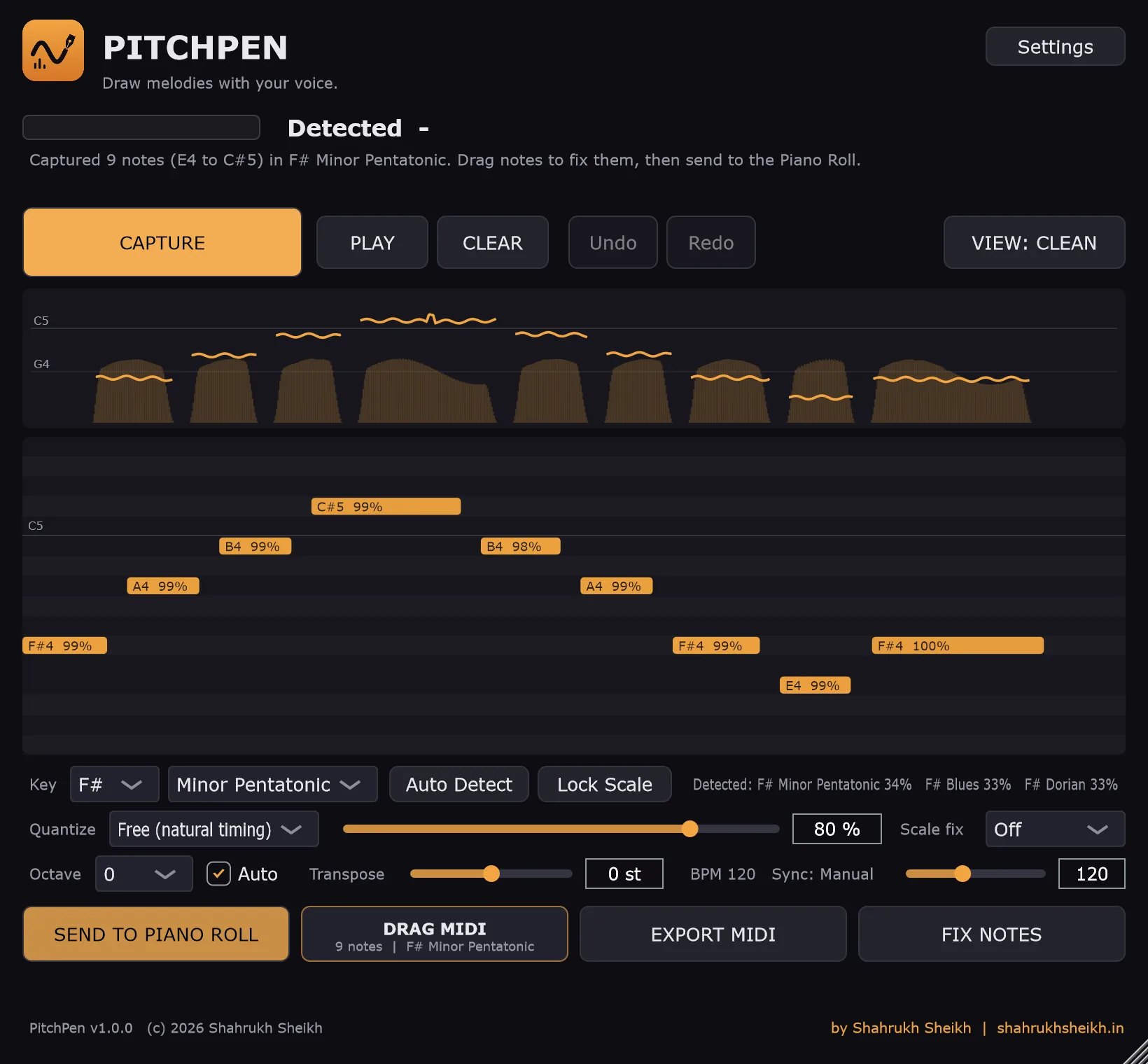
The idea in one picture: a wavering hum on top, the six notes PitchPen keeps below it.
While you sing
You can watch it understand you.
The most reassuring thing a voice tool can do is show its working. While you capture, PitchPen draws what it hears as you hear it, so you know straight away if the room is too noisy or you are too quiet.
- A scrolling pitch curve with note names, so you see the shape of the tune as you sing it.
- Loudness bars under the curve, which also decide how hard each note will be played later.
- A level meter with a clipping warning, so a too-hot microphone is obvious.
- A live readout of the current note, its frequency, how many cents sharp or flat it is, and how sure PitchPen is.
- An optional 3-2-1 countdown so you can get ready before it starts listening.
Before and after
The cleanup is the product.
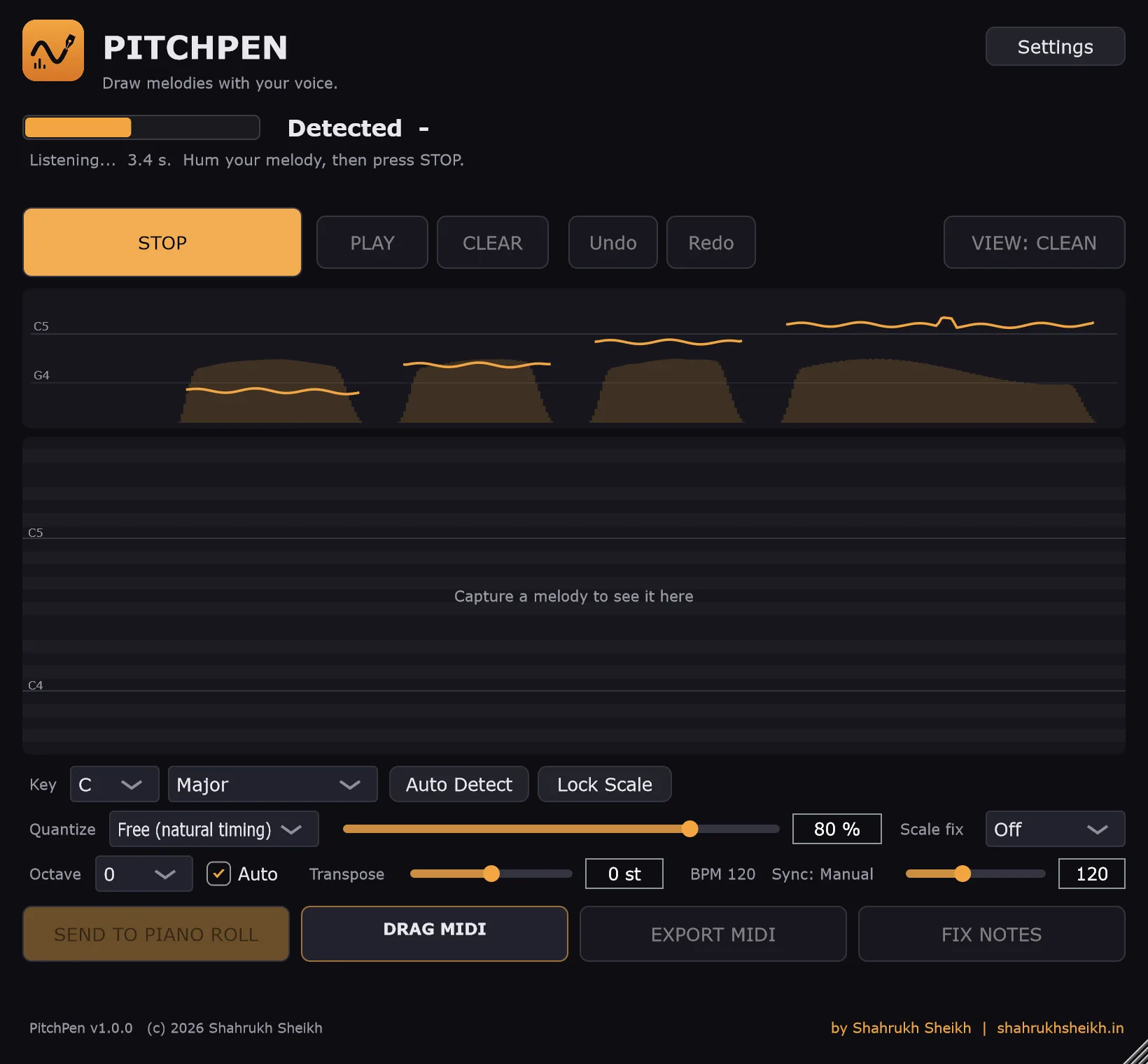
Anyone can turn a pitch into a note name. The hard part is deciding when you meant a new note and when you just wobbled. The same take is shown twice below, once the naive way and once with PitchPen's cleanup.
Before Every pitch change becomes a note
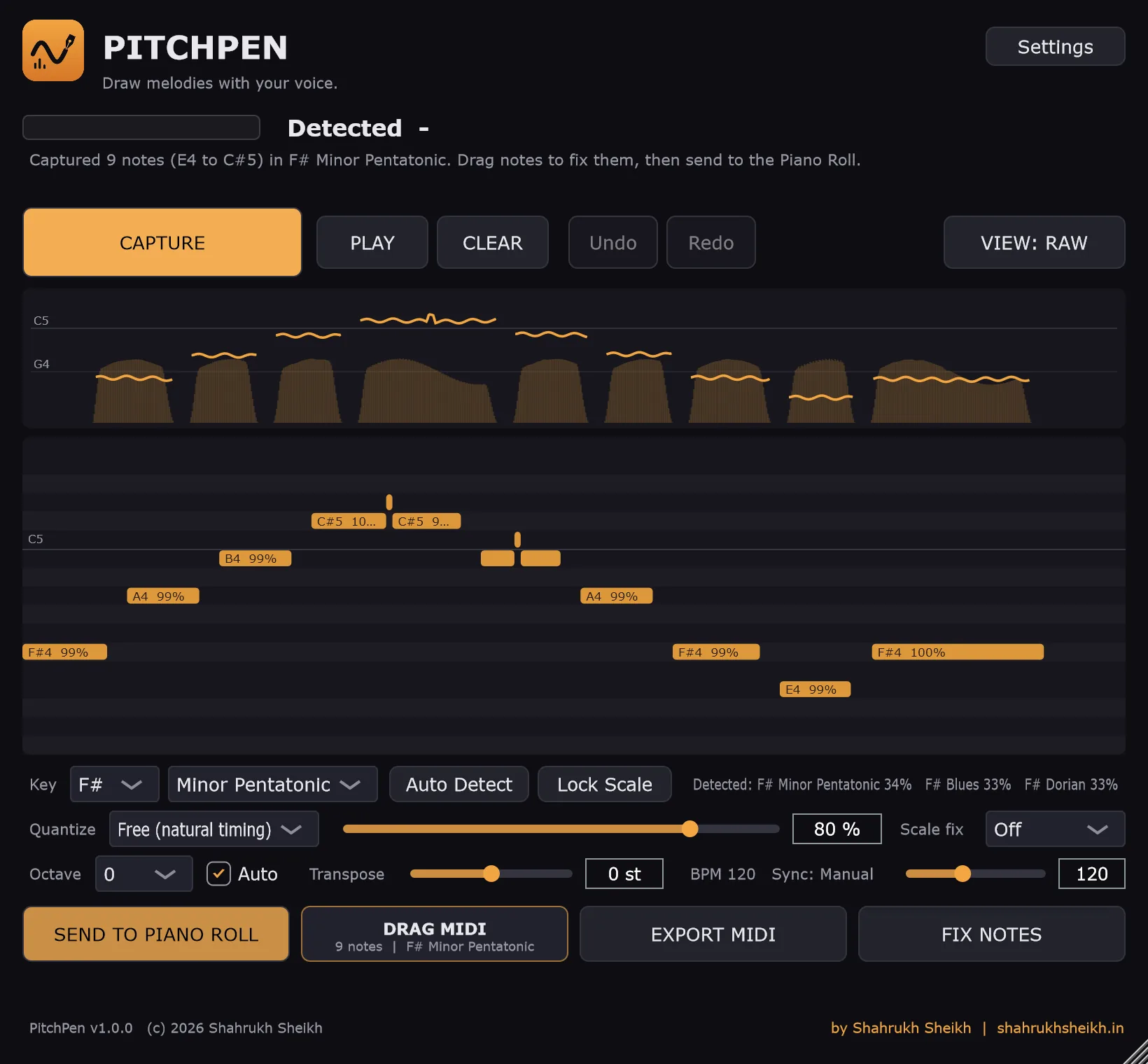
Raw view: what a plain converter gives you. Extra fragments appear wherever the pitch wobbled or slipped.
After The notes you meant
Clean view: nine notes, each with its confidence. Same voice, same take.
These screenshots are the real PitchPen window. To get a repeatable take, the voice is a generated test voice: a hummed F# minor phrase with deliberate vibrato, notes sung up to 25 cents out of tune, and one short slip a semitone away. PitchPen's job was to hear nine notes through all of that, and it did.
Made for people who aren't singers
It holds the note you meant, not the one you drifted to.
Computers hear pitch as an exact number, and a note changes the instant that number crosses halfway to the next one. Real voices drift, so a note you hold steady can flicker between two neighbours. PitchPen adds a tolerance, so a note only changes when you have clearly moved on.
| Mode | A new note starts when you are… | Good for |
|---|---|---|
| Tight | 50 cents from the held note | Trained or in-tune singers, whistling |
| Normal | 65 cents from the held note | Most humming |
| Loose default | 85 cents from the held note | Anyone who drifts, which is most of us |
A "cent" is a hundredth of a semitone, so 100 cents is one piano key. The default is the forgiving one on purpose. Auto Octave is on by default too: it lifts a low hum into a normal instrument range, so a melody sung around C3 arrives around C5, where a lead sound is happy.
Presets
Six starting points.
| Preset | Tolerance | Min. confidence | Ignore notes shorter than | Merge gaps shorter than | Smoothing |
|---|---|---|---|---|---|
| Clean Vocal | Tight | 60% | 60 ms | 60 ms | Low |
| Humming | Normal | 50% | 70 ms | 80 ms | Medium |
| Whistle | Tight | 60% | 50 ms | 50 ms | Low |
| Loose Singer | Loose | 40% | 90 ms | 100 ms | High |
| Fast Melody | Normal | 50% | 30 ms | 40 ms | Low |
| Slow Melody | Normal | 50% | 120 ms | 120 ms | High |
Changing any of this after you've captured doesn't mean singing again. The pitch track is kept, and the notes are rebuilt from it instantly.
Fix it with the mouse
A small piano roll, just big enough to clean up a take.
On the notes
- Drag a note to move it in time and in pitch. It snaps to the grid when quantizing is on.
- Drag its right edge to make it longer or shorter.
- Press Delete, or right-click, to remove it.
- Mouse wheel over a note, or right-click, to change how hard it plays.
- Uncertain notes are outlined in red with their confidence on the note, so you know where to look first.
Around the notes
- Undo and Redo for every edit, up to 100 steps back (Ctrl+Z and Ctrl+Y work too).
- Play the melody with a simple built-in tone to check it, with a moving playhead.
- Fix Notes smooths short slips and nudges stray notes onto the key in one undoable step.
- Raw / Clean view to compare against what a plain converter would have produced.
- Clear to start over. Settings changes rebuild the melody without re-singing.
Every feature
Everything PitchPen does.
Listening
- Microphone input straight from your audio device. Pick the device in the app's Options menu.
- Input gain from −24 to +24 dB and a noise gate from −70 to −10 dB (−40 by default).
- A 70 Hz high-pass filter and DC removal clear rumble before pitch tracking. Nothing heavier, because heavy filtering hurts pitch accuracy.
- Any number of input channels is mixed down to mono.
- Monitoring is off by default, so a microphone can never feed back through your speakers. Switch it on if you want to hear yourself.
- Works at 44.1, 48, 88.2 and 96 kHz. The analysis window scales so it always covers about 32 ms.
Understanding the voice
- YIN pitch tracking from 60 Hz to 2 kHz: deep voices, high voices and whistling.
- A confidence for every moment. Breathy or unsteady singing gets a lower score, not a hard "no".
- Glitch absorption: a blip too short to be a real note is folded back into the note around it.
- Gap bridging: a breath between two equal notes doesn't split them.
- Minimum note length and minimum confidence are both yours to set.
- Smoothing at Low, Medium or High merges short notes into longer neighbours: 40, 80 or 150 ms.
Key and scale
- Detects the key among Major, Natural, Harmonic and Melodic Minor, Major and Minor Pentatonic, Blues, Dorian, Phrygian, Lydian, Mixolydian and Locrian.
- Shows the three best guesses with a percentage, so a close call looks like a close call.
- Auto Detect or Lock: pick a key and scale yourself and it stays, even for the next capture.
- Scale fix at Off, Gentle (only slightly-off, uncertain notes) or Strict (everything onto the scale).
- Relative keys are told apart: C Major and A Minor share the same seven notes, and PitchPen still picks the right one from where your melody starts, where it ends and which notes it lingers on.
Rhythm
- Free timing keeps your natural rhythm. A grid of 1/4, 1/8, 1/8T, 1/16, 1/16T or 1/32 tidies it up.
- Quantize strength from 0 to 100%, so 80% fixes the sloppiness and keeps some human feel.
- BPM from the host when it runs as a plugin, or set by hand from 40 to 240 in the app.
- The pause before you start singing is trimmed, so the first note lands at the start of the pattern.
- Notes are placed where you sang them: the detection delay is compensated.
- Humanize timing adds up to ±25 ms of repeatable variation.
Pitch and dynamics
- Auto Octave moves the whole melody by whole octaves toward a comfortable range (centred on F#4).
- Or set the octave from −2 to +2 and transpose by up to ±12 semitones.
- Velocity from your voice: fixed, voice dynamics, or compressed dynamics (quiet notes are lifted).
- Set the minimum and maximum velocity, so a quiet hum still plays at a usable level.
- Humanize velocity adds up to ±20 of variation.
Getting it out
- Send to Piano Roll for FL Studio: one click here, one menu click there.
- Drag MIDI: a handle that drags a real .mid file into FL Studio's Piano Roll or Playlist, or any other DAW.
- Export MIDI: a standard MIDI file with the tempo included, to any folder.
- The file is a Type 0 MIDI file at 480 ticks per quarter note, with plain Note On and Note Off events.
- Friendly messages, not error codes: "We couldn't detect a clear melody. Try singing a little louder or move closer to the microphone."
- A diagnostics view (pitch, frequency, confidence, level, latency, buffer and sample rate) stays hidden until you turn it on.
In FL Studio
Two ways to run it, one way into the Piano Roll.
FL Studio doesn't let a plugin write notes into another instrument's Piano Roll, and I chose not to fake it with mouse tricks. Instead, PitchPen writes a small Piano Roll script that carries your melody, and FL Studio runs it from its own Scripts menu. It is one extra click, and it uses only what FL Studio officially supports.
The stand-alone app simplest
Uses your microphone directly, with no routing inside FL Studio.
- Open PitchPen, press Capture, hum, press Stop.
- Press Send to Piano Roll.
- In FL Studio, open the instrument's Piano Roll.
- Click the wrench (Tools) at the top left, choose Scripts, then PitchPen_Import, and press OK.
As a VST3 plugin
PitchPen is an audio effect, not an instrument, so it goes on a Mixer insert.
- On a Mixer insert, set the Input to your microphone and add PitchPen to an effect slot.
- Capture as usual. In the plugin the host's tempo is used for timing.
- Use the same Send to Piano Roll and Scripts steps.
- Or press and drag Drag MIDI straight into the Piano Roll or Playlist.
Tried and checked in FL Studio 2026 on Windows 11: the melody arrives in the Piano Roll as ordinary notes that play through whatever instrument is on that channel. PitchPen never makes the sound itself.
In other DAWs, use Export MIDI or Drag MIDI. They produce a standard MIDI file, which is how every DAW takes notes.
Compared
What a plain pitch-to-MIDI converter doesn't do.
| When you… | PitchPen | A plain converter (typical) |
|---|---|---|
| Hum a wobbly note | One note, even through vibrato and slips | Many short notes |
| Sing a little flat or sharp | Keeps the note you meant (Loose mode) | Flips to the neighbouring semitone |
| Sing in a low register | Auto Octave lifts it to instrument range | Plays in your voice's register |
| Want it in a key | Detects the key, optionally snaps notes to it | Leaves every note as sung |
| Care about rhythm | Free, or a grid with 0–100% strength | Raw timing, or hard-snapped |
| Find a mistake | Edit the note, or rebuild without re-singing | Sing the whole take again |
| Want it in your project | Piano Roll script, drag MIDI or a .mid file | Export a file and import it yourself |
| Worry about privacy | Everything stays on your PC | Varies by product |
General behaviour of simple converters, not a comparison against any one product.
Under the hood
What it's built with.
- Core
- A
C++17library with no plugin or UI code in it: pitch tracking, note cleanup, key detection, quantizing and MIDI writing. It knows nothing about FL Studio, which is what keeps other DAWs possible later. - Pitch tracking
- The
YINalgorithm on a window of about 32 ms (1,536 samples at 48 kHz) that moves forward in steps of a quarter window, around 125 times a second. Parabolic interpolation refines the result, and a weak but periodic signal still returns a lower confidence instead of nothing. - Notes and keys
- Pitch hold with tolerance, glitch absorption, gap bridging and smoothing for notes. For keys: the Krumhansl-Kessler major and minor profiles plus approximate profiles for the other scales, scored by cosine similarity multiplied by how much of the melody the scale covers.
- Plugin shell
JUCE 8withCMake: one codebase builds theVST3plugin and the stand-alone app. A dark interface drawn in code, with the logo as the only image.- Threads
- The audio thread only filters, meters and hands samples to a lock-free queue, with no allocation and no locks. A separate high-priority analysis thread tracks pitch. The interface only reads the results. Because the analysis thread keeps every frame, changing a setting rebuilds the melody instantly.
- FL Studio bridge
- A Piano Roll script that PitchPen generates itself, with the melody built into it as data. FL Studio runs Piano Roll scripts in a restricted Python that blocks file access, so the data has to travel inside the script. The case study tells that story.
- Shipping
- The Windows installer is built with Inno Setup. The program uses a static C++ runtime, so a clean PC needs nothing else installed. The file is about 5 MB.
- Tests
- 52 tests with 231 assertions, built on
doctest. A separate harness loads the real VST3 the way a DAW does (stereo, editor open, audio running), and another feeds a generated voice through the real engine and checks the notes that come out.
Settings behind the gear
Simple on top, adjustable underneath.
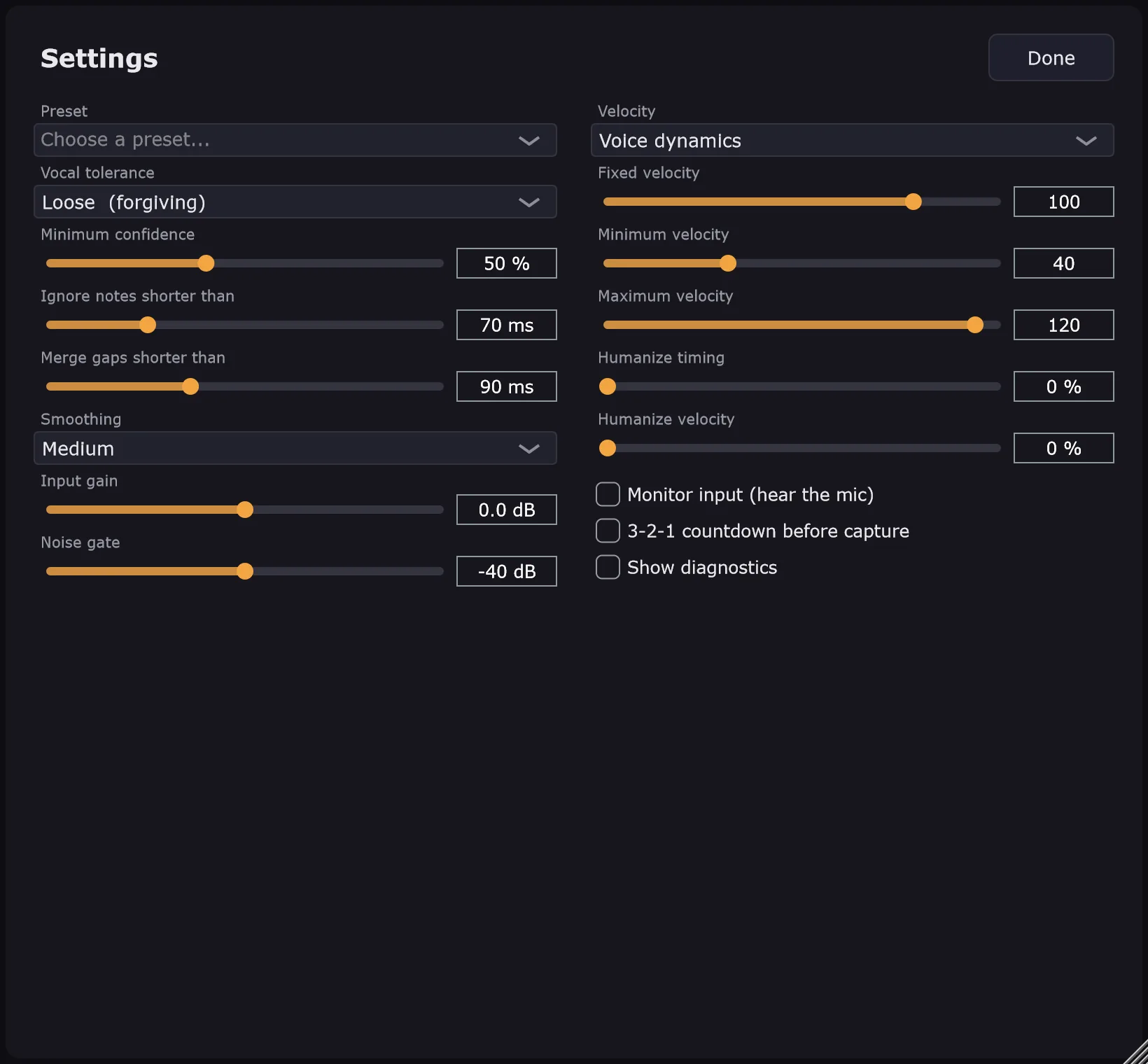
The main window has no technical settings on it. Everything a producer shouldn't need, from presets and vocal tolerance to velocity ranges, humanizing, monitoring and diagnostics, lives behind one Settings button, so the first screen stays: capture, look, fix, send.
Most of what you see there are the numbers from the tables above. The few that aren't are the input gain, the noise gate and the velocity range.
Privacy
Your voice stays on your computer.
PitchPen has no account, no analytics and no network code of its own. Nothing is uploaded. The audio is analysed as it arrives and only the pitch information is kept in memory for the current session. The things it does write are local: the melody file and the Piano Roll script it generates for FL Studio, and a temporary .mid file when you drag MIDI out. The only link that leaves the app is the one to this website, and only if you click it.
System requirements
What it needs.
| Windows | Windows 10 or 11, 64-bit |
| Microphone | Any microphone Windows can see, with microphone access allowed |
| FL Studio | FL Studio 2026 was used for testing. A version with Piano Roll scripting is needed for the one-click route. |
| Other DAWs | Any DAW that takes a standard MIDI file or a VST3 plugin |
| Disk space | About 13 MB installed (the installer is about 5 MB) |
| Internet | Not needed |
Being honest
What it doesn't do.
- One voice at a time. It follows a single melody line. Chords and harmonies aren't supported.
- Capture, then edit. It doesn't yet turn your voice into live MIDI while you sing, so you can't play an instrument with your voice in real time.
- It hears pitch, not intent. The Loose mode and the editor help, but it can't know a note you didn't sing.
- Classic signal processing, not a neural network. It is light and private, but very noisy rooms or whispering can defeat it.
- Plain notes. No pitch bend or expression yet.
- Windows only, and one-click Piano Roll import is for FL Studio only.
- Not code-signed. Windows SmartScreen would ask for confirmation on any installer I hand out.
FAQ
Questions people ask first.
Can I download or buy PitchPen?
No. It's a personal project, built because I wanted it, and I'm not selling or publishing it. This page and the case study exist to show what it does and how it's built. If you'd like something like it made for your own workflow, get in touch.
Is it AI?
No. It uses a classic pitch-detection algorithm (YIN) and music-theory rules, and all of it runs on your computer. I looked at neural pitch models and left them out for version 1: they need a large runtime and model file, and a classic method is fast, private and easy to test with generated sounds.
I'm not a singer. Will it still work?
That's who it is designed for. Humming a steady, slightly drawn-out "laaa" or "naaa" works best. The default Loose mode forgives drifting, and every note can be fixed by hand. A quiet room and a microphone close to your mouth matter more than your voice.
Why does FL Studio need a script? Can't the plugin put notes in the Piano Roll directly?
No. FL Studio has no public way for a plugin to write notes into another channel's Piano Roll. Piano Roll scripts are the official way to add notes from outside, so PitchPen uses one. The alternative would have been simulating mouse clicks, which breaks with every update.
Does it work in Ableton, Logic, Cubase, Reaper or Studio One?
The pitch and note engine is the same everywhere, and the MIDI file it exports is a standard file those programs can import. What's FL-specific is only the one-click Piano Roll script. I have tested only FL Studio.
Why a VST3 plugin and an app?
They are the same program. The app is the easiest, since it talks to your microphone directly. The plugin lives inside the DAW and reads the project's tempo. Both do the same job and both can send the melody to the Piano Roll.
Does it need the internet or collect data?
No and no. See Privacy.
What would you build next?
A live mode that sends notes as you sing, so a voice can play any instrument. Pitch bend for gliding notes. Bridges for other DAWs. Those are the real next steps, not hidden gaps.
How it got here
From a written brief to a working plugin.
1.0.0 October 2026 · current
- Windows app and VST3 plugin with branding, an installer and a static runtime.
- Piano Roll bridge rewritten after finding FL Studio's script sandbox: the melody now travels inside a generated script.
- Raw / Clean view now shows what a plain converter would produce, so the comparison means something.
- Forgiving defaults for untrained singers: Loose tolerance and Auto Octave on.
Pre-release 1–3 October 2026
- The core engine and tests, then the plugin with live pitch curve, editable notes, undo, playback, key lock and presets.
- Checked as a VST3 loaded the way a DAW does, and end to end with a generated voice.
Scope September 2026
- A written scope and architecture document first: seven ways of reaching FL Studio compared, one chosen, and the "no mouse tricks" rule set.
Want the build story: why the pitch algorithm was chosen, how a key is told apart from its relative minor, and the four ways FL Studio's script sandbox said no?
Read the case study