Case study · React Native · PHP · MySQL · Operations
Three taps at the gate, and a price the phone isn't allowed to decide.
The Parking Check-In App logs vehicles in and out and prices every stay. This is how it's built: one record per stay, a server that owns the amount, twelve feature switches behind a hidden role, a plate scanner with a flaw, and why the screens on these pages are drawn from the code.
The problem
A gate has seconds per car, and a spreadsheet has none.
A parking contractor's day is a stream of vehicles in and out, each needing a time, a type, a price and a slip, with a queue forming behind whoever is at the gate. On paper that's a register book and a calculator. In a generic app it's a form with too many fields. The owner's questions at night are simple: how many vehicles, how much money, and does it match the drawer.
The brief was a phone app where each step at the gate is as few taps as it can be, where the attendant never does sums, and where the owner's total comes from the same records the attendants made.
One record per stay
Entry and exit are the same row.
The data model is deliberately small. A vehicle's whole stay is one row in parking_records: the vehicle category, the plate, the entry time, the attendant who logged it in, then later the exit time, the amount and the attendant who logged it out. Marking a vehicle out doesn't create anything, it completes the row, so duration, category and price never have to be matched up by hand.
Receipt numbers are serial and given by the server. Both the entry and the exit time come from the server's clock, not the phone's, so a phone with the wrong time can't produce a wrong stay.
The server owns the price
Where a parking app can quietly lose money.
Money in a parking lot leaks at the point where an amount is decided, so the phone isn't allowed to decide it. Each category has a price, a number of included hours and an extra charge. When a vehicle is marked out, the server reads the entry time and the category's rates, takes the current time from its own clock, and works out the amount: the base price, plus the extra charge for every started hour beyond the included ones. One hour and ten minutes over is two extra hours, by design.
The vehicles list uses the same function, so the amount shown on a parked vehicle is a live figure that grows with the clock, and what the attendant sees before tapping Mark Out is what will be charged. The function takes plain numbers and returns plain numbers, which makes it the easiest part of the whole system to test, and I'd add a test suite there first.
Twelve switches and a hidden role
Letting the owner turn parts of the system off without a new release.
Parking lots change their minds: a client wants deleting disabled after a bad week, or reports hidden from staff, or printing switched off while a printer is repaired. Instead of shipping a build for each wish, the system keeps a table of settings, each a one or a zero, and the server checks the relevant one before it will add a user, delete a vehicle, mark one out, produce a report and so on. The app reads the same switches to hide the buttons, but the real enforcement is on the server.
Changing a switch needs a role nobody else sees. The hidden superuser signs in and receives a 12-hour token, and the server stores only the token's hash. One deliberate choice: if the app can't read the switches (a network hiccup), it assumes everything is on and carries on, because a settings error shouldn't stop a gate. That favours availability over strictness, and the server's checks still apply.
The plate scanner
Reading a number plate without sending a photo anywhere.
Typing a plate with a queue behind you is where mistakes happen, so the entry form has a Scan Number Plate button. It opens the camera, takes a photo and runs Google's on-device text recognition, so nothing leaves the phone. The result is then cleaned up and matched against a plate-shaped pattern (two letters, one or two digits, up to three letters, three or four digits) and put into the form for the attendant to confirm.
The clean-up has a flaw I found reading the code back for this page. To fix common recognition mistakes it replaces O with 0, I with 1, Z with 2, S with 5 and B with 8 across the whole string, before matching. That helps in the digits and hurts in the state code: a plate that begins with letters like BR, OD or TS has its letters turned into digits and no longer matches. The fix is to apply those swaps only to the positions that must be digits.
Printing
A queue, because attendants tap twice.
Slips print to a Bluetooth thermal printer, formatted with the library's simple markup. Two taps in quick succession would send two jobs to a printer that can only take one, so every job goes through a small queue that runs them one at a time and retries a failed job once after 700 milliseconds. A failure never blocks the next job. The receipt's heading, tax number, contractor and disclaimer come from one settings file, which is convenient for a single client and means each new client needs its own build.
The code also asks for the Bluetooth permissions that Android 12 and later require before it prints, and tells the attendant plainly when they're refused.
Why these screens are renderings
I couldn't run it, so I drew what the code says.
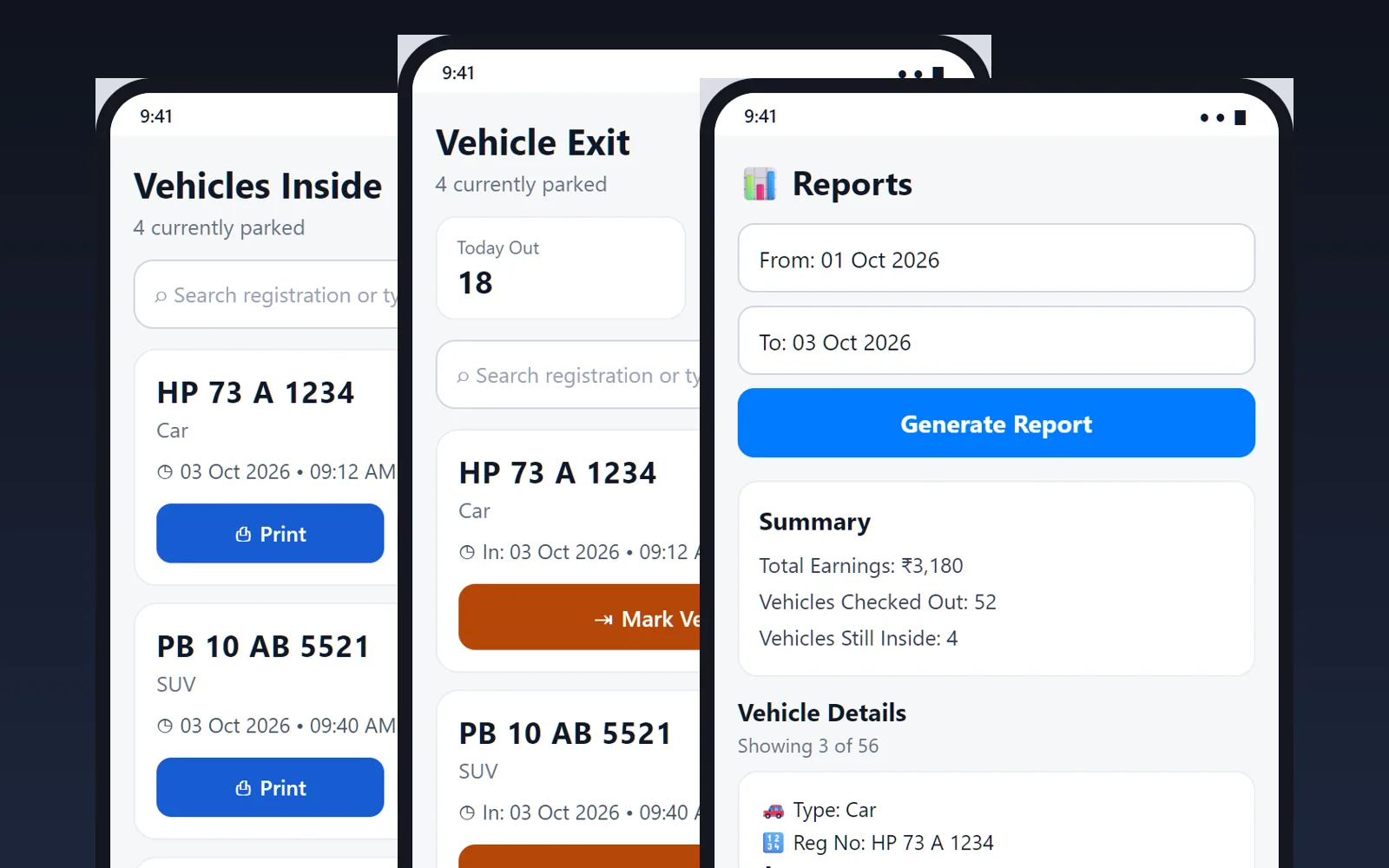
For this page I wanted real screenshots. The Android toolchain isn't installed on my computer at the moment, so the app can't be built or run. Instead I read the screens and drew them: the colours, the labels, the tabs for each role, the buttons, the empty states and what each list row shows all come from the source. The data is invented and exact spacing is approximate, and the page says so next to every picture.
Reading the code that carefully is also how I found the plate-scanner flaw and noticed that the receipt numbers are chosen as "the last number plus one" without a database lock. Two entries at the same instant could collide. That's a rare case at a single gate and worth fixing before a lot with several.
The architecture
What's actually running under it.
- App
React Native 0.79with React 19, JavaScript, and React Navigation: a stack for sign-in and role-specific tab navigators for Admin, InUser and OutUser.- Camera and OCR
react-native-vision-cameraand Google ML Kit text recognition, run on the device.- Printing
react-native-thermal-printerover Bluetooth, behind a promise queue with one retry.- Server
- About twenty plain PHP endpoints using PDO with prepared statements, one for each action, and a shared pricing function.
- Database
MySQL: users with roles, vehicle categories (price, hours, extra charge), parking records, app settings and superuser sessions.- Access
- Passwords checked with
password_verify; the superuser receives a random 12-hour token whose hash is stored; feature switches are checked on the server. - Size
- About 5,900 lines of app code across screens, navigation and utilities (including old copies of some screens), and about 1,800 lines of PHP.
- Verification
- No automated tests beyond the project's default one. Checked by use, and by reading the code for this page.
The outcome
Honest about where it actually is.
The app does what a parking gate needs: log, price, print and total, with a login per attendant and a way for the owner to turn parts of it off. The pricing is the part I'd trust most, because it lives in one small function on the server.
What it isn't: tested by a suite, offline-capable, or finished. There's a plate-scanner clean-up to fix, a receipt-number lock to add, tests to write around the pricing function, and an Android build to set up again so I can take real screenshots.
Run a parking lot or a gate-based business and want an app built around it?
Get in touch