Case study · Python · YOLOv8 · ffmpeg · PyQt6
Deciding what's threatening without pretending to measure distance.
R.A.S marks the cars, buses, people and animals in a motorcycle ride video. This is how it decides which ones get a loud red marker, how it streams a 4K video through two ffmpeg pipes, and what I found when I read the code back to write this page.
The problem
Detecting objects is the easy half. Deciding which one deserves attention is the design problem.
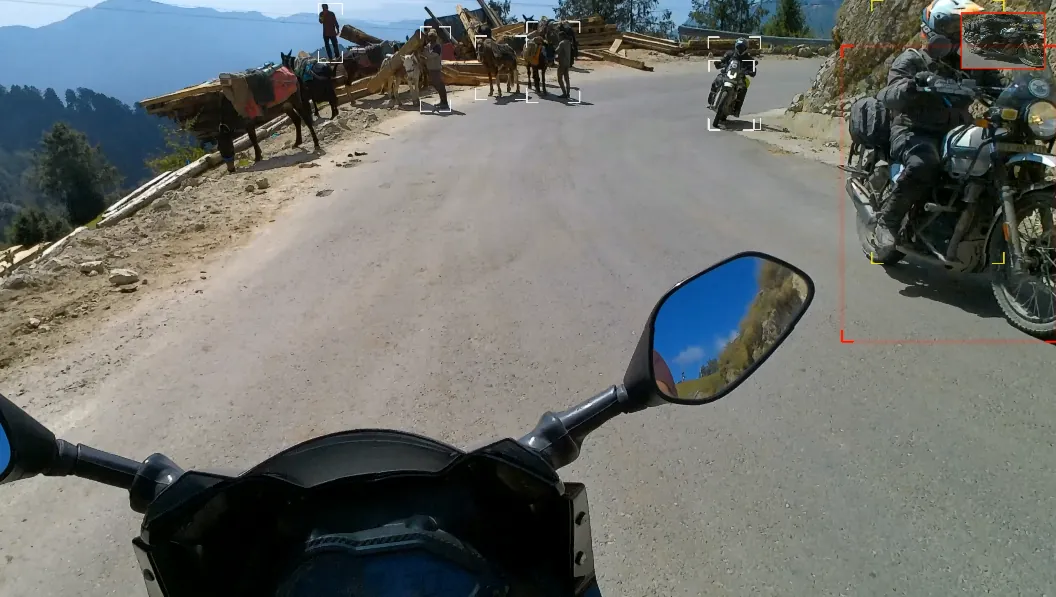
A helmet-camera ride is full of things: cars, buses, people, animals. A detector like YOLOv8 will box every one of them in every frame, and a screen with forty boxes on it is noise, not a story. A parked car three lanes away and a truck filling the lane both come back as "vehicle, found".
What a viewer needs is the one thing that matters in the frame, shown louder than the rest, without a research-grade depth system behind it. And it had to run on a vlogger's desktop on a whole ride, not on a ten-second demo.
The approach
Use how much of the frame an object fills as a stand-in for how close it is.
Real distance from a single moving camera needs depth models and calibration. R.A.S skips that on purpose. It divides the area of each detected box by the area of the whole frame, and calls that number closeness. Over 7% is red, over 3% is yellow, and everything else is white.
On a camera fixed to a helmet this is a decent proxy: things that fill the view are usually near. It's also wrong in easy-to-name ways, such as a large vehicle far down a straight road, and the project says so rather than dressing it up. That honesty is the point, because the same shortcut would be unacceptable in a real safety system and is perfectly fine for making footage read better.
The rules, in code
Four small rules decide what gets drawn.
| Rule | What the code does |
|---|---|
| Which objects | Only names in the profile's list: person, car, motorcycle, bus, truck, dog and cow. Everything else the model finds is ignored. |
| Dashboard ignore | If the bottom of a box is lower than 70% of the frame height, it is skipped. On a handlebar camera, the bottom of the picture is your own bike. |
| Closeness | Box area divided by frame area. Over 0.07 is red, over 0.03 is yellow, anything else is white. |
| Red pulse | A red bracket's thickness is 4 plus a value from 0 to 2 that follows a sine wave of the frame number, at the speed set by the profile (0.3). A wider red outline is also drawn on a copy of the frame that is later blurred into a glow. |
| Glow | The copy of the frame is blurred with a 25 pixel kernel and blended over the real frame at 15%. The markers themselves are drawn sharp on the real frame. |
All of the numbers above live in one JSON file, profiles/motorcycle.json, not in the code, so a bicycle or a dashcam profile is a file copy and a few edits.
The pipeline
Frames flow through two pipes, and the video is never held in memory.
A 4K frame is about 25 MB as raw pixels (3840 by 2160 by 3 bytes), and a ride has tens of thousands of them. So R.A.S never loads the video. It starts two ffmpeg processes: one decodes the file into raw frames on its output pipe, and one reads processed frames from its input pipe and encodes them. The Python loop sits in the middle, reading one frame, detecting, drawing and writing it on.
The encoder is also given the original file as a second input, so it can copy the audio stream across untouched. The output stops with the shorter stream to keep sound and picture in step. Before any of that, ffprobe reads the width, height, frame rate and frame count, which is where the progress percentage comes from.
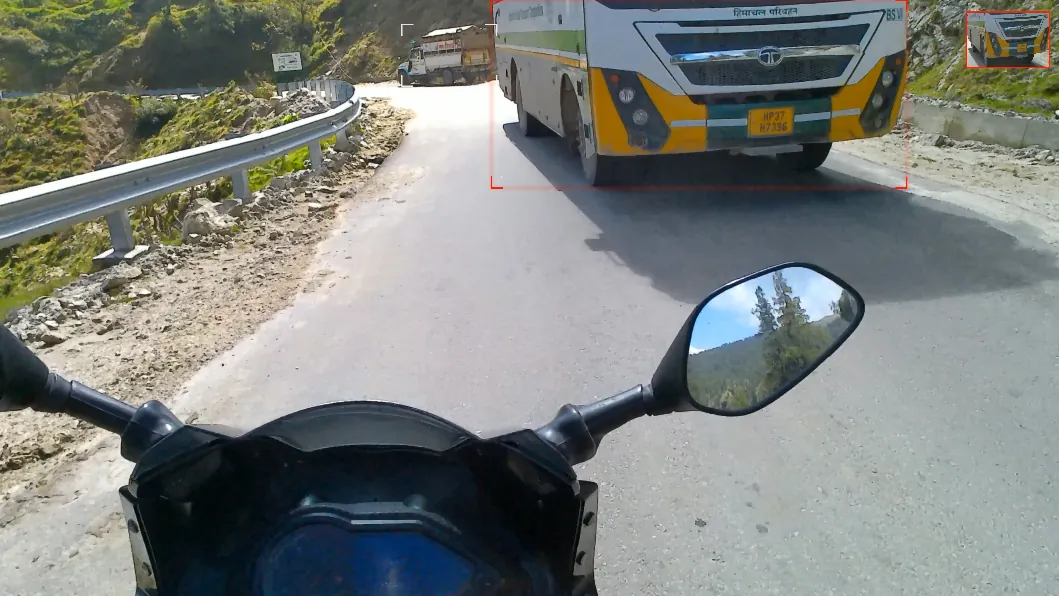
A frame from the demo ride. The bus fills enough of the picture to cross the 7% line, so it is red.
The encoder choice
Asking ffmpeg what it can do, and what that doesn't prove.
R.A.S runs ffmpeg -encoders and looks for h264_nvenc. If it's there, the video is encoded on the NVIDIA hardware encoder at constant quality 18. If not, it falls back to libx264 at CRF 18. Both are high quality, and the fast path costs the CPU nothing while the GPU is busy detecting.
There is a catch I've noticed reading the code back for this page, and haven't tested. The encoder list shows what the ffmpeg build supports, not what the computer has. On a PC with no NVIDIA card, a full ffmpeg build can still list NVENC, and the encode would then fail instead of falling back. The reliable fix is to try a one-frame NVENC encode first and fall back if that fails. It is on my list, and until it's tested on a machine without an NVIDIA card I'm not going to claim the CPU path works there.
What it gets wrong
Three honest weaknesses, all from the same decision.
No memory between frames. Each frame is judged alone. There's no tracking, so a vehicle sitting right on the 3% or 7% line can flip colour from one frame to the next. Averaging the closeness over a few frames would calm it down, and it is the next thing I'd add.
Whole-number frame rate. The frame rate read from the file is passed to the encoder as int(fps), so 29.97 fps footage is described as 29. I haven't measured the effect on a long clip. The sample ride is exactly 30 fps, so I would have missed it if I hadn't read the line back.
A small model. YOLOv8n is the quickest of the family, which is what makes a whole ride feasible, and it misses small, far or partly hidden things. A bigger model would catch more and render more slowly, and the model file is the only thing you'd change.
Shipping it
A 3.4 GB executable, and why it isn't on GitHub Releases.
The README tells people to download RAS.exe from Releases, so a Windows user can double-click it with no Python installed. PyInstaller builds it as a single file with the model, ffmpeg, ffprobe and the profile inside. The catch is PyTorch with CUDA support: the finished file is about 3.4 GB, and GitHub caps a release file at 2 GB. So the Releases page is empty today, and I've corrected the page you are reading to say so rather than repeat the README.
A one-file build also unpacks itself into a temporary folder every time it starts, which is part of why a file this big starts slowly (I haven't timed it). The honest options are a folder-style build in a zip split into parts, a CPU-only build that's a fraction of the size, or hosting the file elsewhere. Until then, running from source is the supported path and the build is available on request.
The architecture
What's actually running under it.
- Detection
ultralyticsYOLOv8n onPyTorch, on the GPU when CUDA is available and on the CPU otherwise. The weights file is loaded from the project folder, or from inside the packaged exe.- Video I/O
- Two
ffmpegprocesses joined to the Python loop by pipes: raw BGR frames out of the decoder and into the encoder.ffprobereads the size, frame rate and frame count first. - Overlay
OpenCVdraws the corner brackets (40 px arms) on the real frame, and a Gaussian-blurred copy is blended over it at 15% for the glow.- Profile
- A JSON file with the allowed object names, the dashboard ignore ratio (0.70), the red and yellow thresholds (0.07 and 0.03), the glow kernel (25) and the pulse speed (0.3).
- Desktop UI
PyQt6. The render runs on a worker thread that reports progress back to the window, so the window stays responsive and the Cancel button can stop the engine.- Command line
ras_cli.pywith--input,--outputand--profile. One video per run.- Packaging
PyInstaller, one file, with the profile, model and ffmpeg programs added as data. No console window.- Size of the code
- About 750 lines of Python in total, 225 of them the engine.
- Verification
- No automated tests. The overlay was checked by eye on real ride footage, and the frames on these pages come from that output.
The outcome
Honest about where it actually is.
R.A.S does what it set out to do: it turns a raw ride into footage with a spotter's eye, entirely on the rider's own PC, with the sound untouched. It is open source because there's nothing to hide in a size rule and a pair of ffmpeg pipes, and because someone building a cycling or dashcam version should be able to start from it.
What it isn't: a safety system, a distance meter, a batch tool or a polished release. The Windows build is too big for GitHub, the encoder fallback needs testing on a PC without an NVIDIA card, and the colours can flicker at the tier lines. Those three, plus the roadmap items in the README (presets, lean angle, live camera mode), are the real to-do list.
Want to try it, read the code, or have something like this built for your own footage?
See the project page