
Content OS Not for sale
Built for Hamrah Podcast · by Shahrukh Sheikh
Personal tool · YouTube · Instagram · Facebook · In daily use
Drop clips in. The stream decides what goes out, where, and when.
Content OS runs Hamrah Podcast's distribution. Each channel gets a rhythm, the clips go into one library, and an hourly scheduler fills the next two weeks: which clip, which channel, which time. Every pick comes with a plain-English reason. I open it for thirty seconds, see "on track", and get back to work.
Self-hosted on my own server · My own API apps and tokens · Not offered as a product
At a glance
Content OS in numbers
3
Platforms, many channels
YouTube, Instagram and Facebook, with several channels per platform, like a main channel and a clips channel.
14
Days planned ahead
The stream refills every channel's next two weeks every hour, so a slot is never missed.
9
Background jobs
Publishing, planning, health checks, analytics, cleanup and thumbnail tests, all on a schedule.
230
Automated tests
1,181 assertions covering the scheduler's rules, publishing and every screen. All passing.
Why it exists
Recording an episode is one job. Getting its clips out properly, every day, is another.
One episode becomes a full video, a trailer and five to ten clips, each needing a slot on a different platform. Doing that by hand, around a day job, meant finished clips sitting forgotten and whole platforms skipped for a week. The requirements were written down in my own words before any code:
Mujhe roz decide nahi karna ki kya post karun.
Ek baar upload karun, baaki system sambhale.
Kuch galat ho to mujhe bataye, chupchaap fail na ho.
How it works
One loop, set up once.
Connect
Sign in to YouTube, Instagram and Facebook through their own login. No passwords stored.
Set a rhythm
"1 a day at 17:00" for the main channel, "once a week" for the clips channel.
Add clips
Drop a batch of videos and thumbnails. Types and pairs are worked out for you.
Autopilot posts
The stream plans 14 days ahead and the queue publishes on time.
Check results
Views come back every six hours. Insights says what's working.
Adjust
Apply the best time, refresh weak clips, add more when the runway gets short.
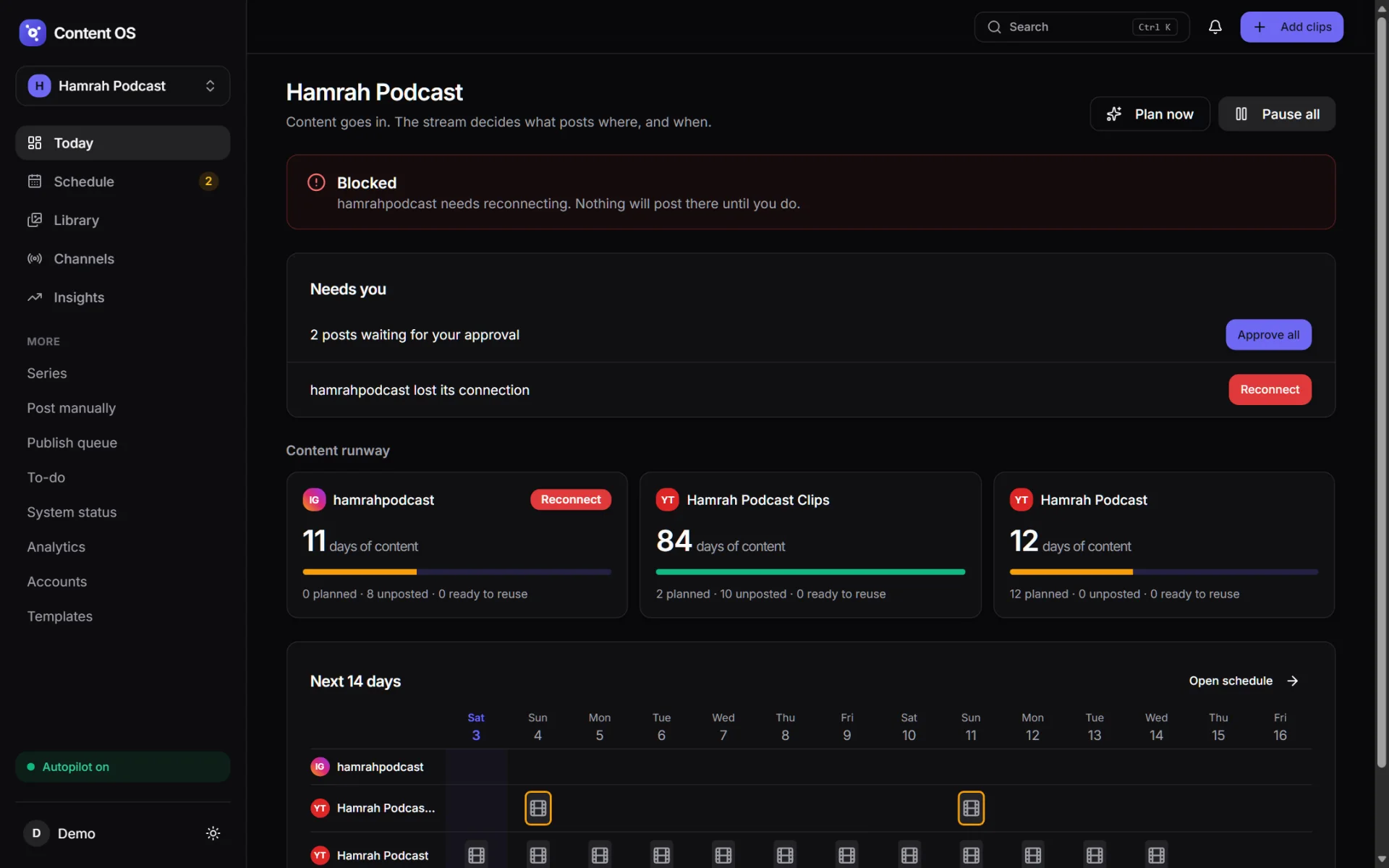
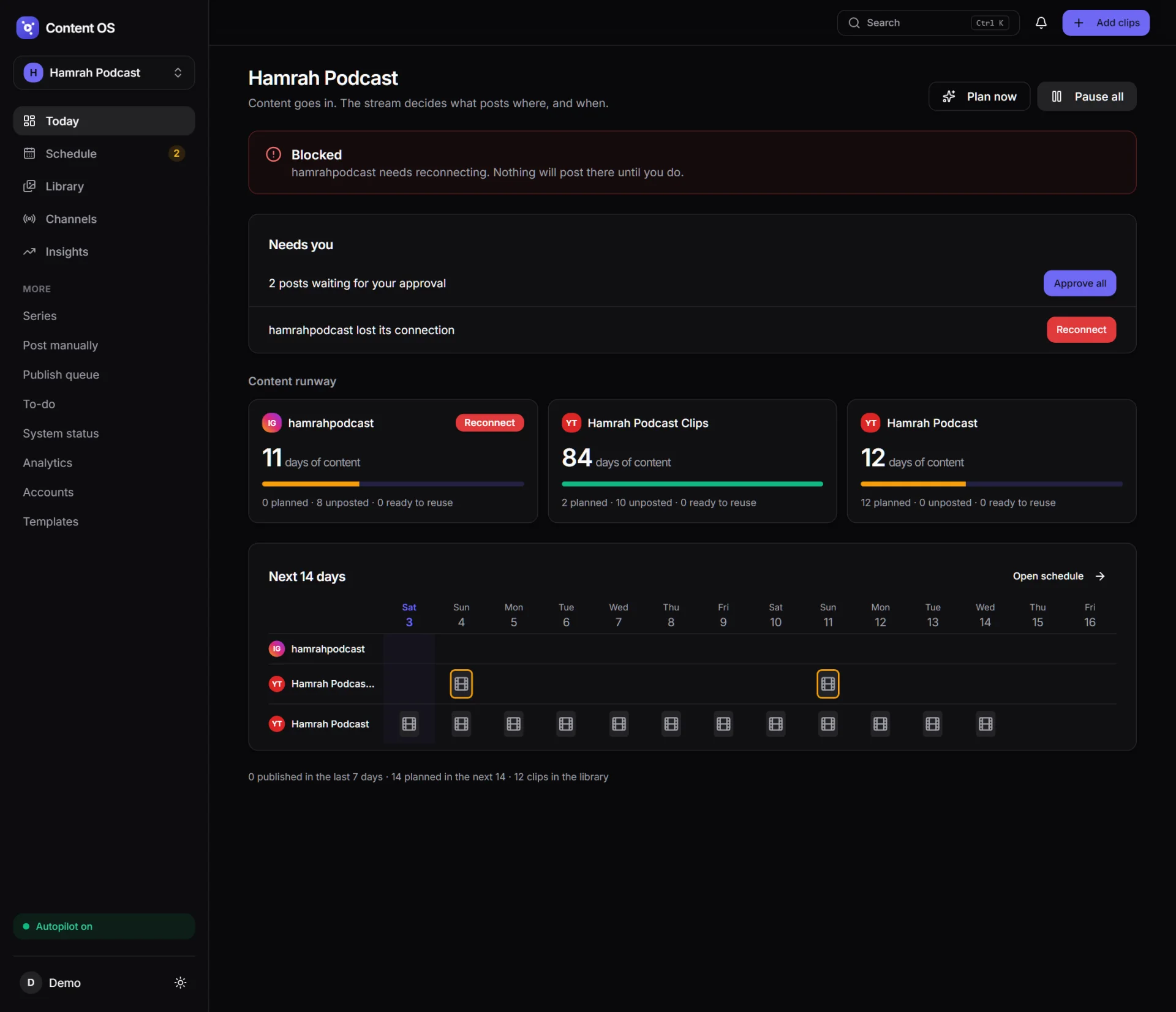
Today
A status board, not a control panel.
The home screen answers one question: is everything on track? It's built for a thirty-second glance.
- One status sentence: on track, needs you, or blocked, with the reason.
- Needs you: at most a few items, each with a single button, such as Approve all or Reconnect.
- Content runway per channel: how many days of posts are left, and how many clips are planned, unposted or ready to reuse.
- Next 14 days as a grid of thumbnails per channel.
- Plan now to refill on demand, and Pause all to stop every post instantly.
The stream
It picks the clip, and tells you why.
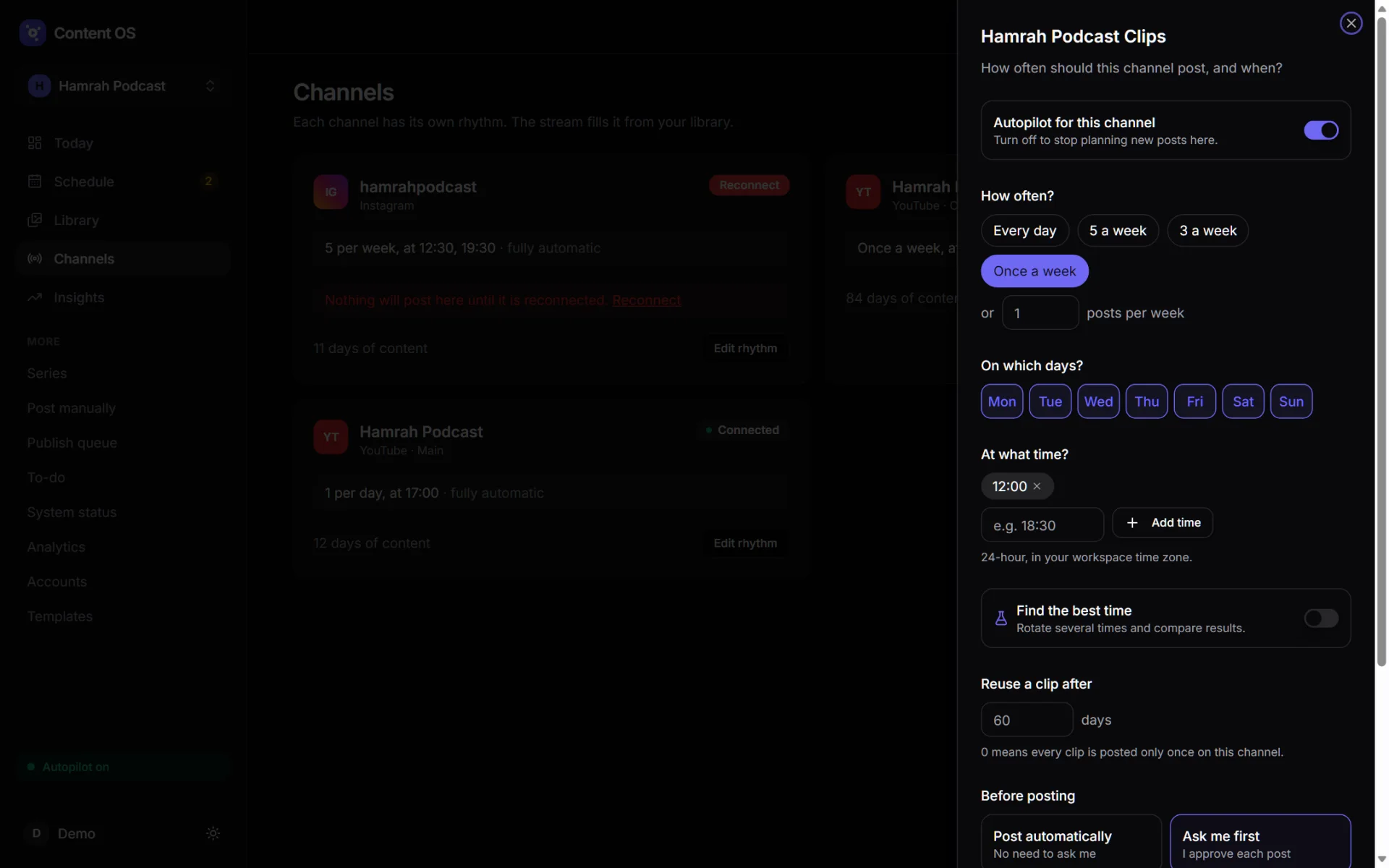
Every hour, for every active channel, the stream turns the rhythm into time slots and fills each one with a weighted pick from the library. Tap the ⓘ on any post to read the reasoning.
- Fresh first: clips never posted on that channel are three times as likely to be picked.
- Variety: two clips from the same episode don't go out back to back.
- Learns quietly: clips like past winners are slightly favoured, and one pick in five is random on purpose so new things get tried.
- Guard rails: a cooldown before any clip repeats on a channel (60 days by default), the same clip at least 3 hours apart across channels, and a series held until its release date. It never posts to a broken connection or while everything is paused.
- Low-library alert when a channel has under a week of content left.
Channels & rhythm
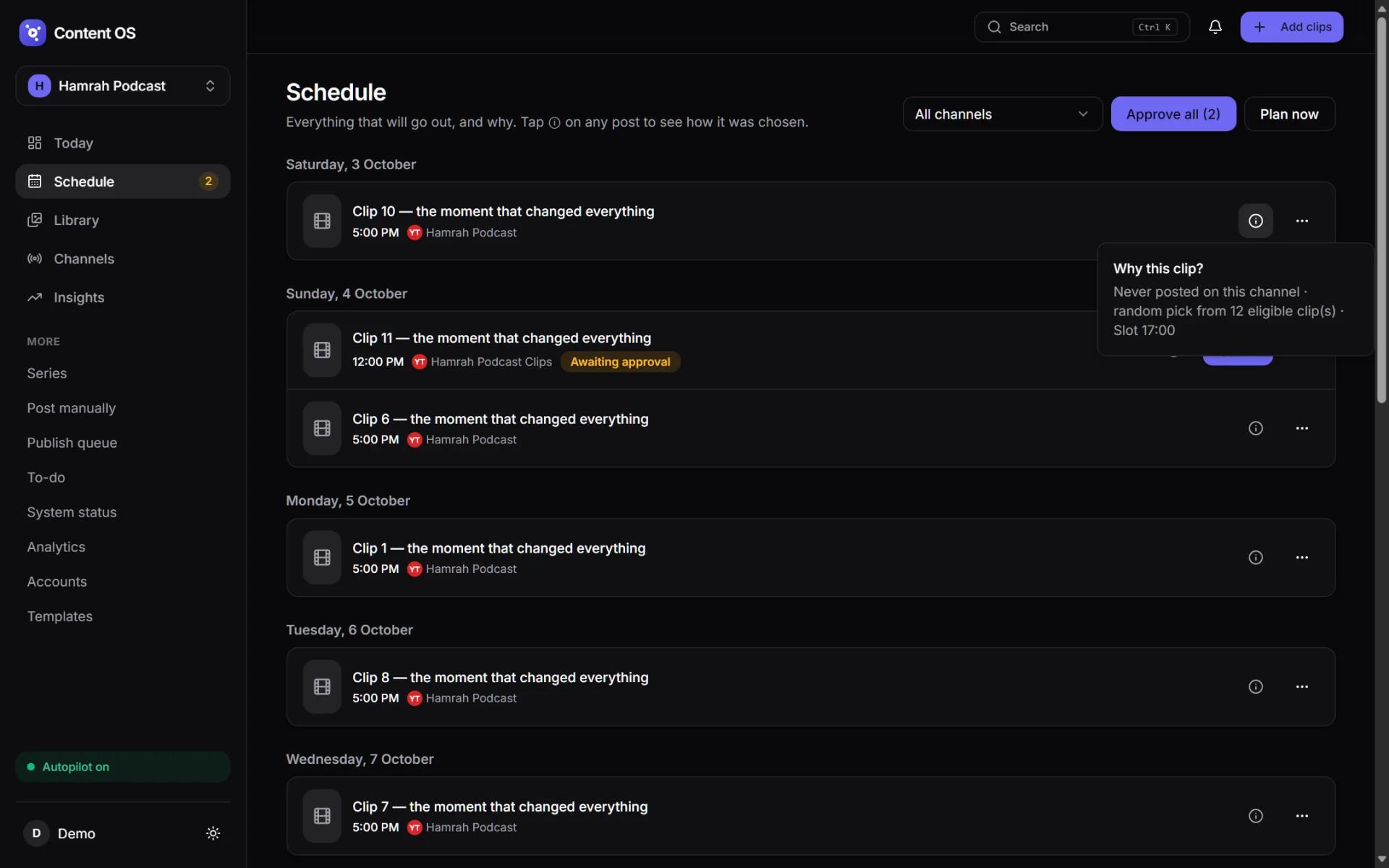
Every channel posts at its own pace.
Each connected channel has its own rhythm, edited in a slide-over written as plain questions.
- How often: presets (every day, 5 or 3 a week, once a week) or any number per week.
- Which days and what times, in the workspace's time zone.
- Reuse a clip after N days, or 0 to post every clip only once.
- Post automatically or Ask me first, per channel.
- Find the best time: list three or four times and the stream rotates them to run an experiment.
- Roles like Main and Clips, so one show can feed several channels on one platform.
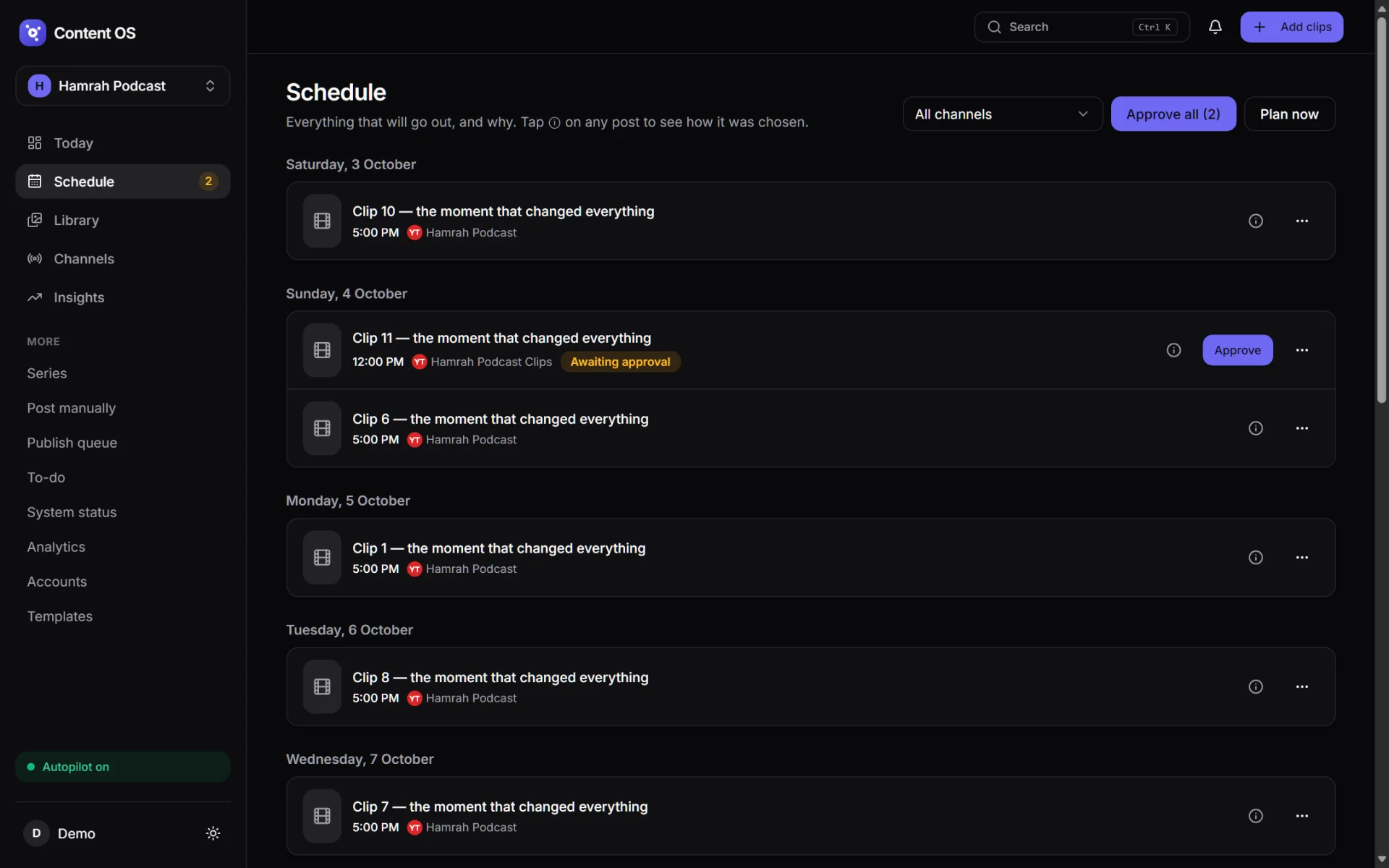
Schedule
Everything that will go out, with an override on every row.
A day-by-day timeline of every planned post, filterable by channel. Nothing the stream decides is final.
- Swap a post for another clip, Change time, Post now or Skip.
- Approve one post or Approve all on channels in "Ask me first" mode.
- Plan now refills the next 14 days without duplicating what's already planned.
Every feature
Everything else Content OS does.
Library & clips
- Bulk upload: drop videos and thumbnails together, and a thumbnail joins its video by file name (
reel-3.mp4+reel-3.jpg). - Each file uploads separately with its own progress bar, so one failure loses nothing. Files already in the library are skipped.
- Type from length: up to 90 s is a Reel/Short, up to 10 minutes a Clip, longer a Full episode.
- Carousels: 2–10 images in order, as one Instagram/Facebook post.
- Platform versions: a separate cut per platform, used automatically on the right channel.
- Edited for one platform only, Keep for reuse, archive, search, filters and Ctrl+K search.
Series (episodes)
- Group one episode's clips into a series.
- Set a release date and its clips are held until that day, so nothing spoils the episode.
- Add the full-episode link once and it's appended to every clip's caption.
- Archive hides a series. Delete keeps its clips, and is blocked while it has published posts.
Publishing
- YouTube: resumable uploads and custom thumbnails.
- Instagram: Reels and carousels, served to Meta through short-lived signed media URLs so the storage is never public.
- Facebook: Page Reels through the phased upload API.
- Every publish is a queued job with stages: preflight checks, upload, then done or failed. A big upload never holds a web request open.
- Preflight: file size and duration are checked against each platform's limits before anything is sent.
- Post manually for one-offs: pick channels, write captions, then schedule, post now or save a draft.
- An optional first comment after each post, such as "Full episode link in bio". The platforms' APIs don't allow pinning it.
Insights & analytics
- Views and engagement pulled from each platform every six hours.
- Best-time experiment: each post is measured 48 hours after it goes live and compared by median views, so one viral post can't decide the winner. It needs 3 posts per time, and 6 before it's trusted. One click applies the winner.
- Top and weakest clips, plus a full analytics list per post with CSV export.
- YouTube thumbnail A/B test: 2–4 thumbnails rotated daily on a published video, with the views each one collected during its turn.
- Hashtag suggestions drawn from the captions of the posts that actually did well.
Captions & routing
- Caption templates with placeholders:
{guest},{episode},{campaign_title},{youtube_url},{publish_date}. - Saved hashtag sets and keyword sets, inserted with one click.
- A default caption and hashtag set the stream uses for every post it plans.
- What goes where: choose exact channels per content type, such as Reels to the main channel and Clips to the clips channel.
Safety & trust
- Pause all: one switch stops planning and publishing until resumed.
- An hourly health check refreshes tokens before they expire. A broken connection shows as Blocked and nothing posts to it.
- Failures are explained in plain words: expired login, missing permission, rate limit, quota, network or invalid media. Network errors and rate limits retry three times automatically.
- A To-do list for failed posts, accounts needing attention, a stuck queue, ready clips with no slot and episodes coming due. Plus a notification bell.
- An activity feed with undo for a deleted clip or a disconnected account.
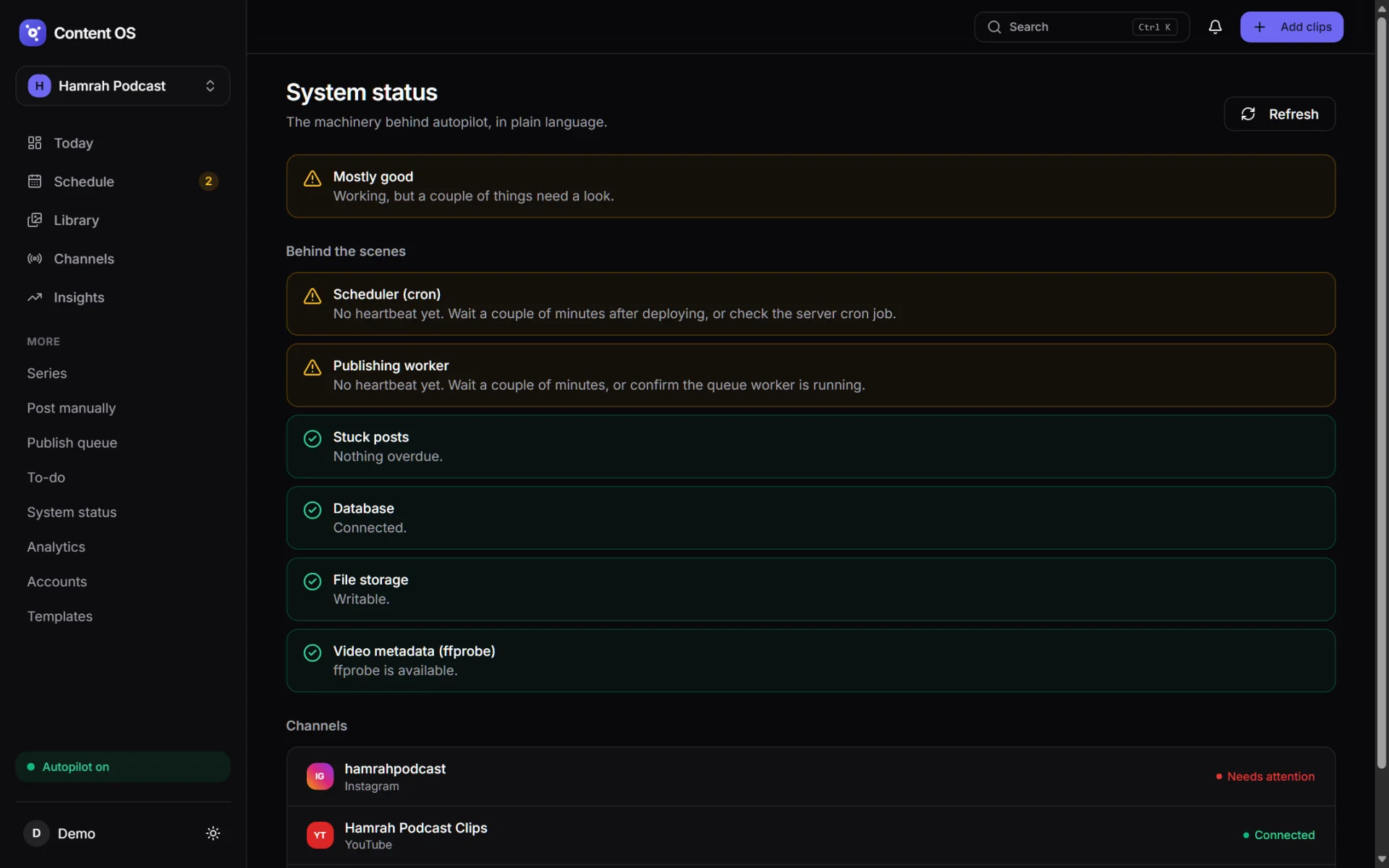
System status
The machinery you can't see, in plain language.
A tool that posts on your behalf has to prove it's alive. The status page checks every moving part and still loads when things are badly broken.
- Scheduler and publishing worker heartbeats.
- Stuck posts, database, file storage and video metadata (
ffprobe). - Connection health of every channel.
- A storage dashboard with automatic cleanup: files of single-use clips are deleted some days after they post, while history and results are kept.
Workspaces & accounts
Built for one owner, structured for more.
Workspaces
- Each show or brand is its own workspace (Hamrah Podcast, Viral Himachal) with separate channels, clips, series, analytics and time zone.
- Switch between workspaces from the sidebar.
- Export a workspace's data, or delete it entirely.
- Sign-ups are switched off: it's a single-owner tool.
Accounts
- Google and Meta sign-in. Each platform's own login page; passwords are never seen.
- After sign-in, pick which channels or Pages to add, including several of the same platform.
- API keys are stored per workspace under Settings, with the exact redirect URI to register.
- Check or disconnect any account; reconnecting picks up where it left off.
Under the hood
What it's built with.
- Backend
Laravel 11on PHP 8.3: policies, queues and a scheduler, with a platform-adapter layer where each network declares its content types and limits in config and gets its own publisher.- Frontend
InertiawithReact 19andTypeScript, shadcn/ui on Radix primitives, Tailwind, lucide icons and Recharts. Started on Livewire and rebuilt screen by screen.- Data
- MySQL in production, SQLite in tests. Clips, series, channels with rhythm columns, distribution slots with their reason strings, publish jobs, analytics snapshots and an activity log.
- Jobs
- Database queue with separate
publishinganddefaultqueues, kept alive by Supervisor on the VPS, plus a cron-driven schedule. - Integrations
- YouTube Data and Analytics APIs, Meta Graph API for Instagram and Facebook Pages, OAuth 2 with state tokens, and temporary signed URLs for media handed to Meta.
- Hosting
- My own VPS under aaPanel. My own Google and Meta developer apps, my own tokens, my own storage.
Scheduled background jobs
| Job | Runs | What it does |
|---|---|---|
publishing:release-due | Every minute | Sends posts that are due to the publishing queue. |
system:heartbeat | Every minute | Proves the scheduler and the worker are alive. |
actions:sync | Every 5 minutes | Rebuilds the To-do list. |
stream:fill | Hourly | Keeps every channel's next 14 days planned. |
accounts:health-check | Hourly | Checks connections and refreshes tokens. |
autopilot:run-due | Hourly | The older campaign autopilot, kept for compatibility. |
analytics:sync | Every 6 hours | Pulls views and engagement from each platform. |
thumbnails:rotate-tests | Daily | Rotates the next thumbnail in each YouTube A/B test. |
media:cleanup | Daily | Deletes files of single-use clips after they've posted. |
Why it isn't for sale
Built to run my channels, not to be a SaaS.
Content OS is shaped around exactly one creator with a day job: a single owner, sign-ups off, and Google and Meta apps registered in my own developer accounts. Turning it into a product would mean verified apps for every platform, multi-tenant billing and support. That's a different project. This page exists to show what it does and how it's built.
If you need something like this for your own show or brand, built and hosted on your own accounts, that's a conversation worth having.
Get in touchHow it got here
Three versions, one idea.
v1 Campaigns
- Episode campaigns with templates, a distribution matrix of every asset against every platform, variants and a rule-based action engine.
v2 The stream
- Rebuilt around research on what grows a podcast: library, rhythm and an hourly scheduler that explains itself. Campaigns became Series.
v2.1 Current
- Every screen moved from Livewire to Inertia and React. Thumbnail A/B tests, system status, platform versions and carousels added. 230 tests.
Want the build story: the platform adapters, and why it's a system rather than a scheduler?
Read the case study